
Business presentations are crucial when you pitch a new client, update your board, or align your team on quarterly goals. They shape decisions and build or break credibility.
The good news is that making a business presentation that actually works is straightforward. It requires no design skills or hours of formatting. It requires a clear process.
This guide walks you through how to make a business presentation from start to finish. You will learn how to plan your content, structure your slides, and deliver with confidence. Every step is practical, and every tip works regardless of your experience level.
Key Takeaways
- Every strong business presentation starts with a clear purpose and a specific understanding of who will be in the room.
- Structure your slides around one core message per slide so your audience stays focused and never feels overwhelmed by information.
- Clean, minimal design always beats flashy templates because it keeps attention on your ideas instead of competing visual elements.
- Practicing your delivery out loud at least twice helps you find awkward phrasing, fix timing issues, and build real confidence.
- Presentations.AI is a business presentation maker that handles slide structure and design so you can focus entirely on your message.
Define Your Purpose and Know Your Audience
Before you open any software, answer two questions. What do you want this presentation to accomplish? Who is sitting in the room?
Lock In a Single Objective
A presentation that tries to do everything achieves nothing. Decide on one clear outcome before you start building.
Are you trying to close a deal? Get budget approval? Align a team on the next steps? Each goal shapes the content, tone, and slide structure in entirely different ways.
Pro Tip: Write your objective as a single sentence and keep it visible while you build. Every slide should earn its place by supporting that sentence.
Map Your Audience
A board of directors needs a different depth than a project team. A prospective client cares about different proof points than an internal stakeholder.
Think through these factors before you draft a single slide:
- Knowledge level: How much context do they already have on this topic?
- Decision power: Are they approving something, or just gathering information?
- Time tolerance: Do they expect five minutes or thirty?
- Primary concern: What objection or question will surface first?
Match Format to Context
A business presentation with forty slides can work against you. Ten slides and a conversation can outperform a polished deck. A single-page summary can work better than a slideshow entirely.
When you define purpose and audience first, the rest of the process moves faster. You stop guessing what to include. You stop over-designing. You start building slides that actually do their job.
Structure Your Slides Around One Core Message
Slide structure is where most business presentations go wrong. People dump everything they know onto the screen and hope something sticks. That approach overwhelms audiences and buries the actual point. Before you start building, it helps to sketch out a presentation outline so you know exactly which ideas belong in the deck and which ones to cut.
One Slide, One Idea
Every slide should communicate a single message. If you cannot summarize a slide's purpose in one sentence, it carries too much weight. Split it into two slides or cut the weaker idea entirely.
This discipline forces clarity. Your audience processes information one piece at a time. When you respect that, they follow your logic without effort.
Pro Tip: Use your slide title as the key takeaway, not a topic label. Instead of "Q3 Revenue," write "Q3 Revenue Grew 14% Quarter Over Quarter." The audience gets the point before reading a single bullet.
Build a Logical Flow
Strong presentations follow a narrative arc, even when the content is data-heavy. Arrange your slides in a sequence that moves the audience from context to insight to action.
A reliable structure for most business presentations looks like this:
- Opening: State the purpose and why it matters to the people in the room.
- Context: Share relevant background so everyone starts from the same place.
- Core content: Present your key points, evidence, or recommendations in order of importance.
- Action step: Close with a clear ask, next step, or decision needed.
Trim Content
After you draft your slides, review every single one with a hard question: Does this slide move the audience closer to the outcome you defined? If the answer is no, remove it.
Note: A shorter presentation that lands its point will always outperform a longer one that loses the room halfway through.
Most professionals add slides out of insecurity. They feel they need more proof, more context, more backup. The opposite is usually true. Cutting weak slides strengthens every remaining slide.
Pick a Clean Design That Keeps Attention on Your Ideas
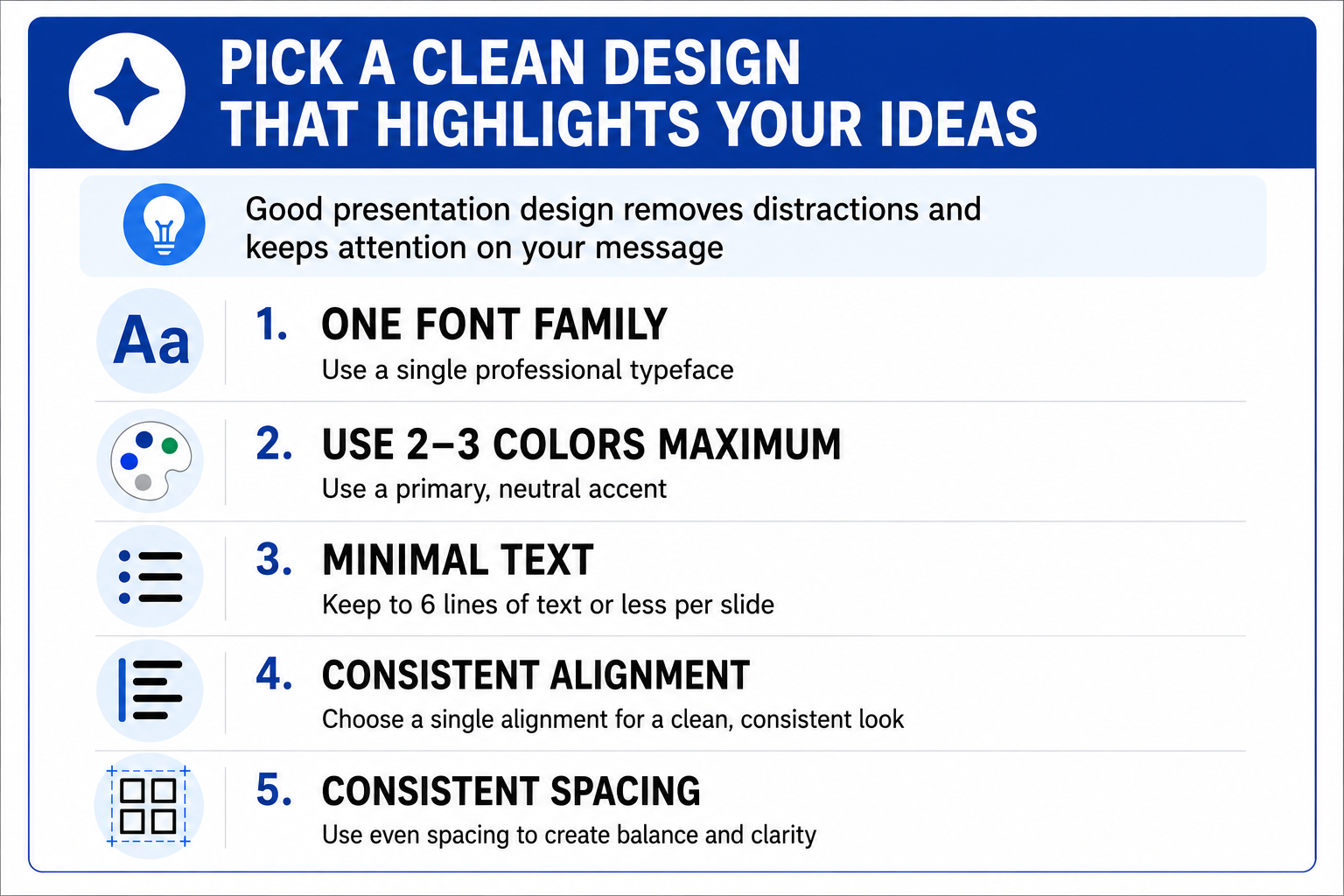
Design is not decoration. In a business presentation, every visual choice either supports comprehension or competes with it. Clean design removes friction so your audience absorbs your message without thinking about the slides. For a quick reference on what works and what does not, these presentation tips cover design fundamentals in depth.
Stick to Visual Minimalism
Flashy templates with gradient backgrounds, heavy animations, and decorative icons pull attention away from your content. Simple layouts with ample white space let your ideas breathe and give the audience room to focus.
Follow these baseline design rules:
Use Visuals That Earn Their Place
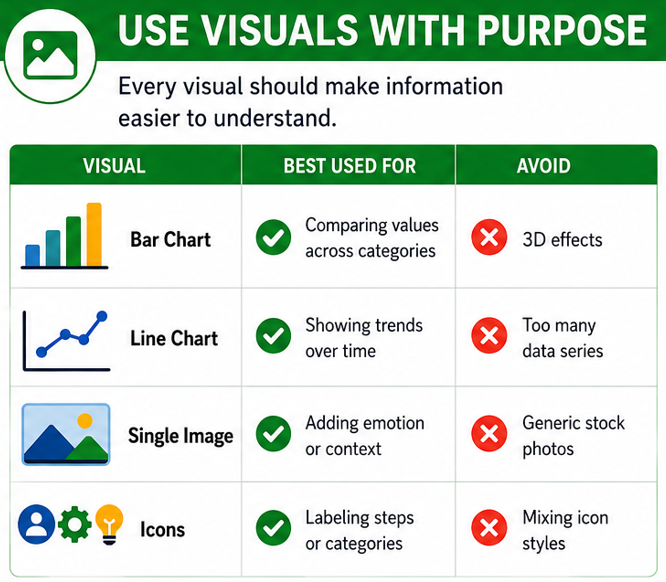
Charts, images, and icons should clarify information, not fill empty space. Before adding a visual element, ask whether it helps the audience understand the point faster than text alone.
Keep Slide Transitions Simple
Every transition or animation adds cognitive load. A simple cut or a subtle fade keeps the audience in your story. Spinning, bouncing, or flying elements signal amateur work and break the professional tone your content needs.
Did You Know: The most effective business presentations often use zero animations. The clarity of the content and the speaker's delivery carry the entire experience.
Practice Your Delivery and Present with Confidence
Presentation skills are built through deliberate practice and a few reliable habits, not innate talent. A polished slide deck means nothing if the delivery falls flat.
Rehearse Out Loud at Least Twice
Silent review of your slides is not a rehearsal. Speaking the words out loud reveals awkward phrasing, sections that run too long, and transitions that feel forced.
Run through the full presentation at least twice before the real event. Time yourself on each pass to confirm you fit your window. Mark any slide where you stumble or lose your thread and simplify that section.
Pro Tip: Record yourself on your phone during a rehearsal. Watching even sixty seconds of playback exposes filler words, pacing issues, and body language habits you would never catch in real time.
Open Strong and Close with a Clear Ask
The first thirty seconds set the tone. Start with a direct statement about why this presentation matters to the people listening. Skip the throat-clearing introductions and the agenda slide nobody reads.
End with a specific action step. Tell the audience exactly what you need from them and by when. A presentation without a closing ask wastes the momentum you built.
Handle Questions Without Losing Control
Questions are a sign that the audience is engaged. Welcome them, but set expectations early. Let people know whether you prefer questions during or after the presentation.
When a question catches you off guard, follow this sequence:
- Acknowledge: Repeat or paraphrase the question so everyone hears it.
- Answer directly: Give the short answer first, then add context if needed.
- Bridge back: Connect your response to a key point in your presentation to keep the conversation on track.
Use AI to Build Your Business Presentation Faster
Planning and structuring a business presentation takes time. Most of that time goes to formatting, not thinking. AI tools now handle the mechanical work, so you spend your energy on the message itself.
Where AI Removes the Bottleneck
The slowest parts of building a presentation are rarely the strategic ones. Choosing layouts, aligning elements, and adjusting spacing across 30 slides can take hours without improving the quality of your ideas. Rewriting bullet points adds to that drain.
AI-powered tools compress that work into minutes. You provide the content direction, and an AI slide creator generates a structured, professionally designed draft that you can refine, rather than building from scratch.
How Presentations.AI Works as a Business Presentation Maker
The Presentations.AI presentation maker turns your input into a complete slide deck. Describe your topic, audience, and goal. The platform produces a structured presentation with a clean design, logical flow, and consistent formatting already in place.
Instead of dragging text boxes and hunting for the right chart style, you start with a working draft. From there, you edit, rearrange, and add your specific data points. The creative decisions stay with you. The production work disappears.
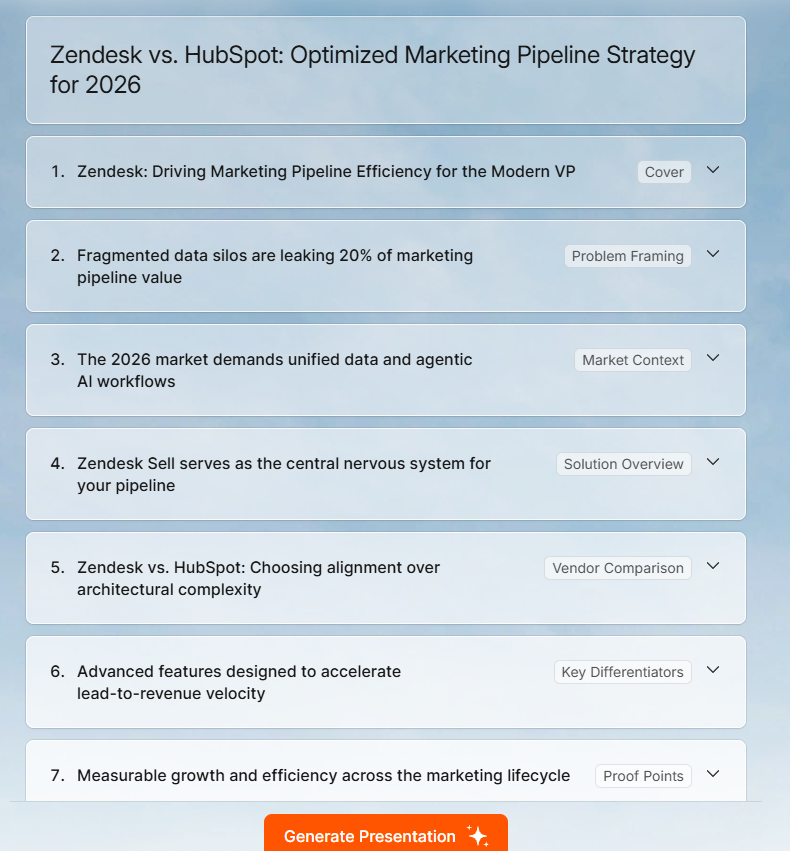
This matters most when timelines are tight. A client pitch due tomorrow morning or a board update scheduled in two hours leaves no room for formatting struggles.
Note: AI preserves your expertise. It removes the busywork between your ideas and a finished presentation, so you arrive at the meeting prepared and focused on the conversation rather than exhausted from slide formatting.
When to Use AI and When to Build Manually
AI works best for standard business presentation formats where structure and speed matter most. Use it when you need a clean first draft quickly and plan to customize from there.
Build manually when the presentation requires a highly custom visual narrative or a format that breaks conventional slide logic. Even then, starting with an AI-generated draft and deconstructing it often saves time compared to a blank canvas.
- Best for AI: Client pitches, team updates, quarterly reviews, internal proposals, training decks.
- Best built manually: Creative campaigns, brand launches, investor storytelling with custom illustrations.
Pro Tip: Use AI to generate your first draft, then spend the rest of your time rehearsing your delivery instead of perfecting slide margins. That trade-off improves outcomes more than any design tweak.
Make Every Presentation Count
A strong business presentation is built on a clear process, not talent or expensive software. Define your purpose, know your audience, build slides around single ideas, and keep the design clean.
The difference between a forgettable deck and one that drives decisions comes down to preparation. A clear objective keeps your content focused. A single idea per slide keeps your audience engaged. Minimal design keeps attention where it belongs. Rehearsing out loud turns nervous speakers into confident ones.
These steps require discipline and a willingness to cut what does not serve the room. The framework applies equally to a five-minute team update and a high-stakes client pitch. Audiences everywhere respond to clarity, structure, and confidence.
Treat every presentation as a structured conversation where every element earns its place. Start with the objective sentence, build only what supports it, and walk into the room ready to lead the discussion. When time is short, let AI handle the production work so you stay focused on the conversation that matters.