TL;DR
- Structure every sales presentation around a five-act arc (Problem, Solution, Proof, Pricing, CTA) to guide buyers toward a decision.
- Lead with the buyer's pain, not your company's story. The problem slide earns attention for everything that follows.
- Use storytelling to make your pitch memorable by casting the buyer as the hero and your product as the guide.
- Avoid common sales presentation mistakes, such as text-heavy slides and generic decks that end without a single clear call to action.
- Presentations.AI lets you generate a structured, on-brand sales deck in minutes so you can focus on delivering the message.
- The best sales deck is not the most beautiful one; it is the one that makes the buyer's next step feel obvious.
Many sales presentations start the same way. The deck opens with a company timeline, rattles through feature lists, and ends with a pricing grid the buyer didn’t request yet. Meanwhile, the prospect mentally checks out somewhere around slide five.
The problem is structure, not effort. Sales teams spend hours building decks. Without a clear narrative arc, even a strong offer gets buried under slides that do not earn their place.
This guide fixes that. You will learn a repeatable, step-by-step process for building a sales presentation that holds attention and moves buyers toward a decision.
We cover the five essential slides every sales deck needs and how to sequence them for maximum impact. You will also see how storytelling turns a pitch into something prospects actually remember, where the most common mistakes occur, and how AI can cut your build time from hours to minutes.
Where Sales Presentations Go Wrong
Think back to the last sales presentation you sat through as a buyer. It probably opened with a company history slide, moved into a feature tour, and buried the pricing near the end. By slide five, you were already thinking about something else.
That is exactly what your prospects experience every week. Decision-makers sit through dozens of pitches each quarter, and most blur together. They follow the same self-centered pattern: here is who we are, here is what we built, here is why we are great. None of it answers the only question the buyer actually cares about: what does this solve for me?
This pattern ranks among the most damaging sales presentation mistakes a team can make. The deck talks to the prospect rather than to their world. Slides overflow with bullet points, jargon, and feature lists, creating information overload. Attention fades long before the seller reaches the ask.
The fix requires structure, not flashier design or more slides. A deliberate sales deck structure, built around the buyer's problem and driven by a story, earns attention one slide at a time. Each slide gives the prospect a reason to stay for the next one.
How to Structure the Flow of Your Sales Presentation
A strong sales deck follows a narrative arc, not a random collection of slides. Every slide earns the right to show the next one. Skip a beat, and the buyer's attention drifts.
The backbone is simple: Problem > Solution > Proof > Pricing > CTA.
This sequence mirrors how buyers actually make decisions. They need to feel the pain before they care about a fix. They need to trust the fix before they consider the cost. A clear next step must appear before momentum fades.
Start in the prospect's world, not yours. Open on the challenge they face or the opportunity they are missing. Build tension around what happens if nothing changes. Only then do you introduce your solution as the bridge from where they are to where they want to be.
Once you present the solution, back it up immediately. Proof removes doubt and keeps the buyer leaning forward. Pricing lands naturally after value has been established. Your closing slide should contain one unmistakable action, not a menu of options.
5 Key Elements of a Sales Deck
Think of this arc as five acts in a short story. Each act has a single job.
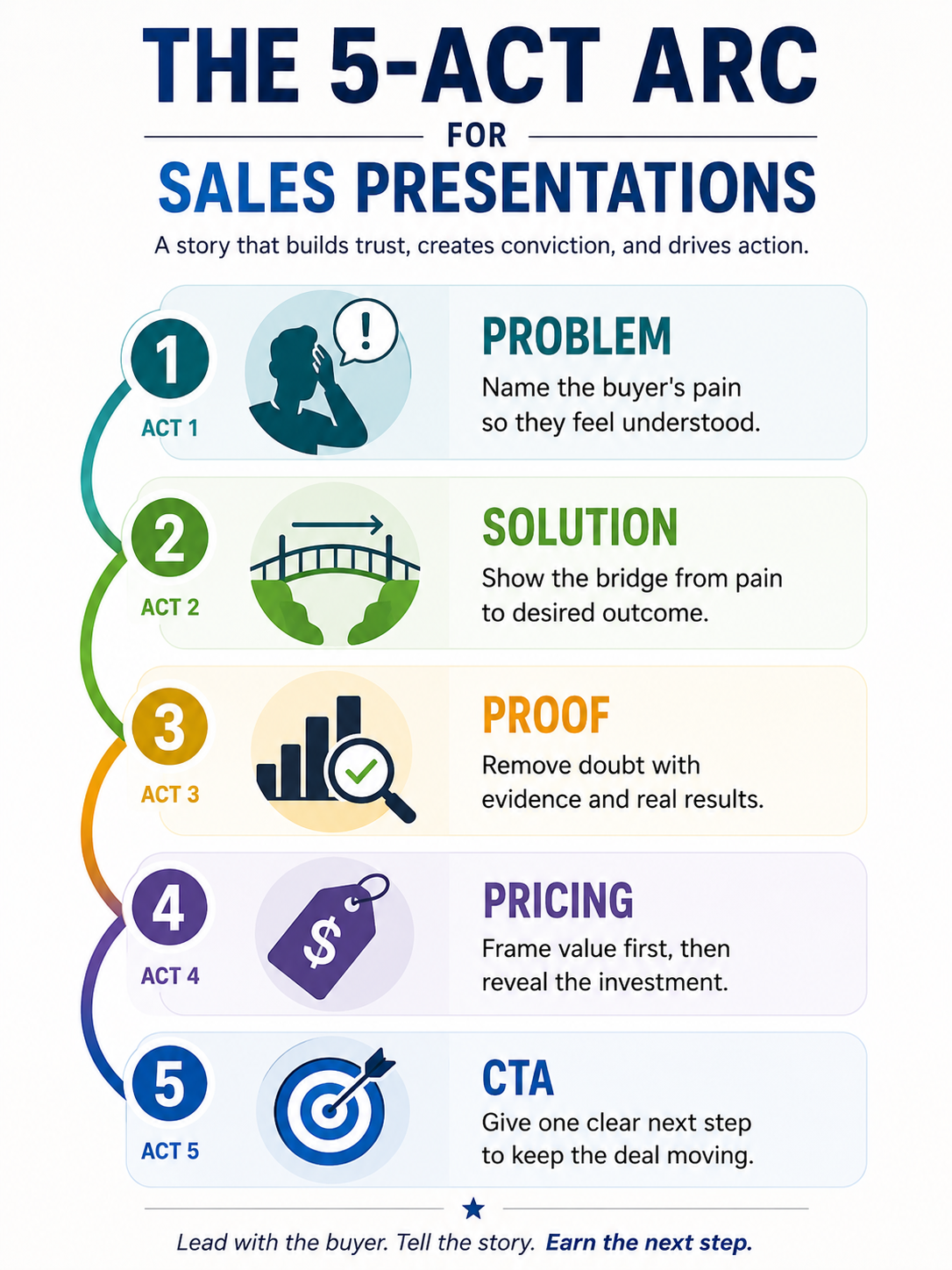
When your sales deck structure follows this progression, every slide feels like a logical continuation. The buyer never wonders why they are looking at a particular screen. That flow is what separates a forgettable pitch from one that closes.
The Key Slides in a Sales Presentation
Structure gives your deck a skeleton. Now you need to fill it with the right slides. Below is a walkthrough of each essential slide type: what it does, what belongs on it, and how to avoid the most common missteps.
Problem and Solution Slides
The problem slide is the most important screen in your entire deck. It earns the buyer's attention for everything that follows. Articulate their pain in their own language, not your marketing copy. Reference the specific challenge you uncovered during discovery, and frame the cost of inaction.
The solution slide bridges the gap. Position your product as the path from the buyer's current frustration to their desired outcome. Focus on the transformation, not a feature list. One clear statement of value beats five bullet points every time.
Proof and Social Proof Slides
Claims without evidence are just opinions. Your proof slides carry the persuasive weight of the entire presentation. Use the format that best fits your audience:
- Case studies that mirror the prospect's industry or company size.
- Testimonials with specific, measurable results.
- Client logos that signal credibility at a glance.
- Data points from your own product that demonstrate real-world impact.
Mix formats when possible. A logo bar paired with a short customer quote is more convincing than either element alone. For a head start on layout, browse sales presentation templates designed around these proven slide types.
Pricing and CTA Slides
The pricing slide trips up more sellers than any other. Frame value before revealing cost. Recap the outcome the buyer will achieve, then present the investment required to get there. Keep options simple, two tiers at most. Too many choices create friction.
Your CTA slide closes the loop. State one clear action: book the pilot, sign the agreement, or schedule the next call. A single ask converts far better than a slide packed with links and calendar options.
How to Use Storytelling to Make Your Pitch Stick
The most effective framework is simple: cast the buyer as the hero, and your product as the guide. The prospect is the protagonist facing a real challenge. Your solution is the tool that helps them overcome it. This shift keeps the spotlight on the buyer's journey rather than on your company's resume.
Build a before-and-after transformation into your deck. Show the prospect's world before your solution: the friction, the wasted time, the missed targets. Then reveal the after: the measurable improvement, the smoother workflow, the results their leadership cares about. That contrast makes value tangible without a single feature slide.
Weave one specific customer success story into your proof section. A real scenario with names, numbers, and a clear outcome is more memorable than a dozen generic claims. Keep it concise: three or four sentences that mirror the prospect's own situation.
The temptation is to stack multiple stories for extra impact. Resist it. One strong narrative thread anchors the entire presentation. Competing stories dilute each other and eat into the time you need for the ask.
Common Sales Presentation Mistakes
Even a well-structured sales deck can stall if avoidable errors creep in. Here are the mistakes that quietly undercut otherwise strong presentations.
- Cramming too much text onto slides. When every slide reads like a document, the buyer reads ahead and stops listening. Let visuals carry the weight. Your voice provides the detail.
- Talking about features instead of outcomes. Prospects buy results, not capabilities. Every slide should answer "so what?" from the buyer's seat.
- Skipping the problem slide. Jumping straight into your product feels efficient, but it robs you of the tension that makes the solution compelling. Earn attention before you pitch.
- Using a generic deck for every prospect. A one-size-fits-all presentation signals that you skipped your homework. Tailor the problem framing and the proof examples to each audience.
- Ending without a clear, single CTA. Multiple asks create hesitation. One specific next step keeps the deal moving forward.
Failing to rehearse transitions and timing. Awkward pauses between slides break the narrative flow. A single timed run-through eliminates most delivery issues. For more guidance, visit sales presentation solutions built around proven frameworks.
How AI Helps You Build a Sharp Sales Deck in Minutes
The biggest barrier to a great sales presentation is the blank slide. You know what to say. You stare at an empty deck and lose an hour wrestling with layout before a single idea lands on screen.
AI eliminates that friction. Feed a short prompt with your prospect's industry, and the key proof points, and an AI deck builder generates a structured first draft in seconds. The five-act arc is already in place. You skip straight to refining the message.
Auto-design handles the visual work. Layout, typography, and color consistency all adhere to your brand guidelines without manual adjustments. Sellers spend their time sharpening the story instead of nudging text boxes.
Personalization at scale is where AI changes the game for teams with a full pipeline. Instead of rebuilding a deck for every prospect, you tailor key slides from a single master version. Each buyer gets a presentation that feels custom without hours of rework.
AI can handle structure, design, and speed. You own the story, the room, and the relationship. Presentations.AI works exactly this way: an AI deck builder for sales presentations that generates a ready-to-edit sales deck from a short prompt. Describe your deal, and the AI presentation maker delivers a polished starting point you can customize before your next call.
Sales Presentation Checklist: From Draft to Delivery
You have the structure, the slides, and the story. Before you open the deck in front of a buyer, run through these five steps.
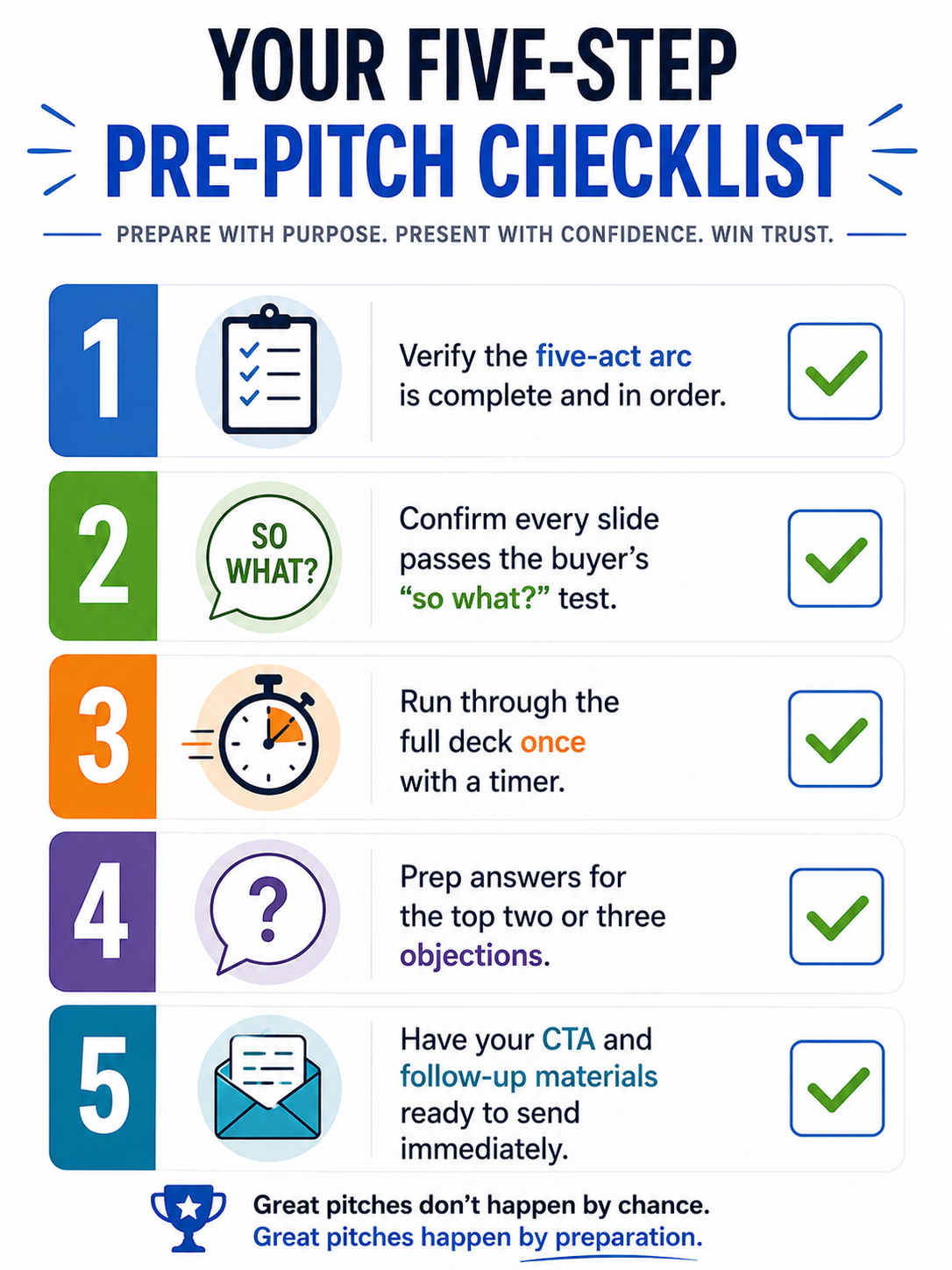
Repeatable Framework to Close Deals
A winning sales presentation comes down to structure, story, and specificity. The five-act arc gives your deck a narrative spine that keeps buyers engaged from the first slide to the final ask. Each slide earns its place by speaking to the prospect's world, not yours. Storytelling makes your pitch memorable. Avoiding common mistakes keeps momentum alive. AI tools let you build a polished, personalized deck without burning hours on layout and formatting.
The framework in this guide is repeatable. Use it for your next deal, refine it based on what you learn in the room, and watch your close rate shift. The best sales deck is the one that makes the buyer's next step feel obvious.