TL;DR
- AI presentation makers convert your text input into a full slide deck by running it through several stages: Understanding intent, writing content, selecting layouts, applying design, and letting you refine the output.
- The content is generated by a large language model, the same type of technology behind LLMs like ChatGPT and Claude.
- Layout choices are automatic and content-driven: a stat-heavy slide looks different from a bullet-point slide because the AI maps content types to appropriate formats.
- Brand application ranges from manual (you set the colors) to automatic. Tools like Presentations.ai extract your visual identity directly from your company URL.
- The biggest quality gap between tools is what happens after the first draft: basic tools give you a manual editor, while better ones let you keep refining with AI in plain language.
- Export quality varies significantly. A deck that looks great inside the tool but breaks in PowerPoint is not ready for professional use.
You type a sentence or two. You hit “Generate”. And roughly half a minute later, there is a full slide deck on your screen, complete with a layout, color scheme, headings, and bullet points that actually make sense.
If you have experienced this for the first time, the natural reaction is somewhere between impressed and confused. How did that happen? What is the AI actually doing in those few seconds? And why does it sometimes feel like the tool completely gets what you are going for, while other times it misses the mark entirely?
This article walks through exactly that. No technical background needed. We will cover the whole process, from the moment you type a prompt to the moment the deck appears, and explain what is happening at each step. By the end, you will have a clear mental model of how these tools work, and what separates the better ones from the average ones.
What is an AI Presentation Maker?
At its core, an AI presentation maker is software that takes text as input and produces a structured, designed slide deck as output. The "AI" part covers several different things happening at once: language models to write and organize the content, design systems to pick layouts and visual treatments, and template engines to render everything consistently.
Most people think of it as a smarter version of a template library. But the better tools are doing something fundamentally different. They analyze what you are actually trying to communicate, not just fill in blanks. And they make design decisions based on the content itself, not just apply a style coat on top of whatever you typed.
Tools like Presentations.ai are built around this idea. You provide the direction, the topic, the story, the goal, and the tool handles execution: structure, layout, design, and brand consistency.
How Does an AI Presentation Maker Work?
From processing the input to generating a somewhat polished deck as output, here is the full pipeline, broken down into six steps.
Step 1: You Provide the Input
Everything starts with an input. That might be a short prompt, a longer block of text covering all your key points, a document you have already written (a Word file, a PDF, or a Google Doc), or even a URL from a website you want to turn into slides.
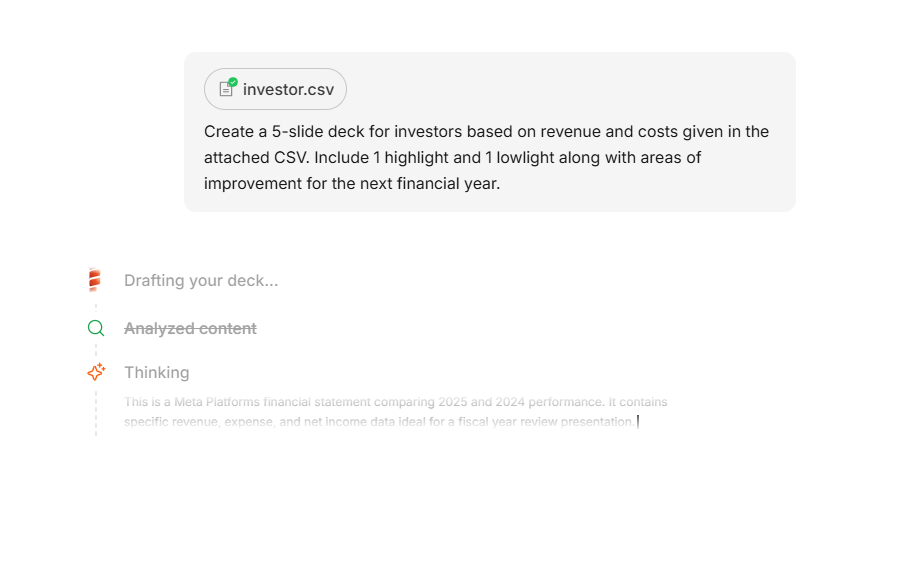
Different tools accept different input types. The more flexible AI presentation makers can handle all of the above. This matters because real work rarely starts with a perfectly worded prompt. Sometimes you have a messy document full of notes. Sometimes you have a competitor page you want to reference.
A good tool should work with what you actually have. If you are still figuring out what your presentation should actually be about, this guide to choosing a presentation topic is a useful place to start before you touch any tool.
Step 2: The AI Figures Out What You Are Building
Before any content gets written, the AI tries to understand the purpose of the presentation. This is called intent detection.
If you type "Investor pitch for a SaaS startup," the AI infers a lot from those few words: this is likely a 10-to-15 slide deck with a specific structure (problem, solution, market, team, ask). It should have a professional tone. It probably needs a metrics slide.
If you upload a research report instead, the AI reads it, identifies the main arguments, and works out a logical sequence of slides that compresses the key points without losing the thread.
This step uses natural language processing, which is essentially the ability to read text and understand meaning rather than just matching words. The quality of this step determines how well the first draft actually reflects what you had in mind.
Step 3: The AI Writes the Content
Once the AI understands the topic and structure, it generates the actual text for each slide: titles, bullet points, body copy, and sometimes speaker notes.
This is powered by a large language model, the same underlying technology behind tools like ChatGPT and Claude. The model has been trained on a huge amount of text, so it understands how presentations are typically structured, what belongs on a title slide versus a body slide, how to write a tight bullet point, and how to move logically from one section to the next.
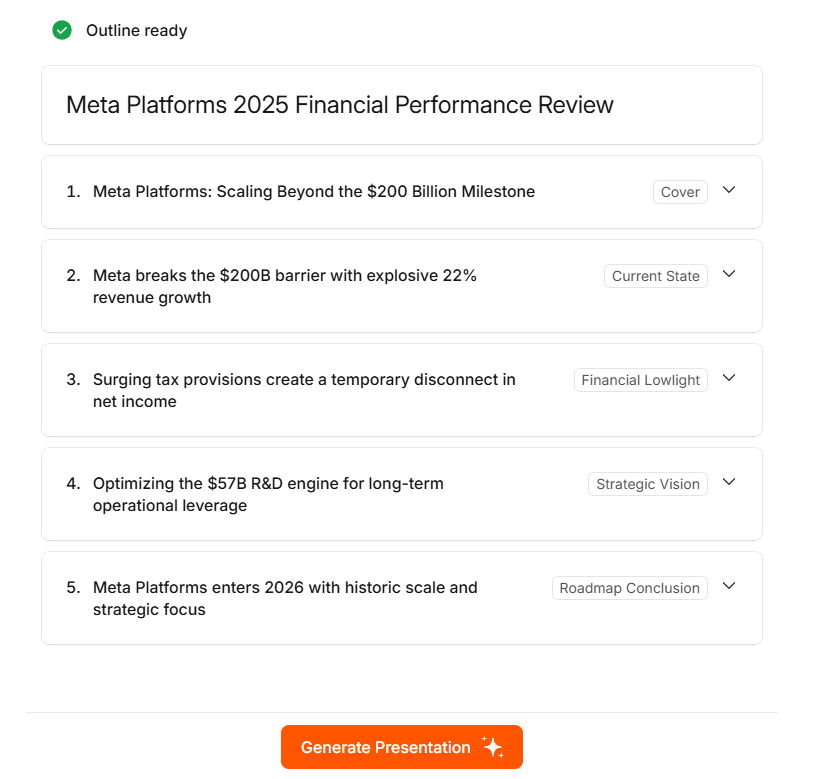
What it produces is new text based on your input, not a copy from somewhere else. The output follows presentation conventions: short headlines, parallel structure in bullet lists, and content that builds from slide to slide.
The quality difference between tools often shows up here. A deck where each slide makes sense on its own but the whole thing has no direction is a sign of a weaker model. A deck with a clear throughline, where slides set up each other and build toward a conclusion, is a sign the AI actually understood what you were trying to say.
If you have not done this before, there is a practical walkthrough on the Presentations.ai guide to building a presentation outline.
Step 4: Tool Chooses the Layout
With the text ready, the AI needs to decide how each slide should look. A slide with one big statistic gets a very different treatment from a slide with five bullet points. A comparison slide needs columns. A process slide might need numbered steps or a visual flow.
The AI maps each piece of content to a layout pattern. It considers how much text is on the slide, what type of content it is (a stat, a list, a quote, a chart), how the slide fits into the sequence, and whether the overall visual balance looks proportional and easy to scan.

This is where presentation templates play a role, but not in the way most people expect. The better tools do not apply a single template uniformly. They select from a library of layout options and match each one to the content type. Presentations.ai uses what it calls "anti-fragile" layouts, which are designs that stay intact when your content changes, rather than breaking apart if you add a word or remove a bullet point.
Step 5: Design and Brand Get Applied
Once layouts are set, the visual layer goes on top: colors, fonts, spacing, and imagery.
If you have connected your brand to the tool, this step applies your company's color palette, fonts, and logo automatically. Presentations.ai does this through a feature called Brand Sync, which extracts your visual identity directly from your website URL. You do not need to configure anything manually. The AI reads your site and applies your brand across every slide from the start.
If you have not connected a brand, the tool applies its own design system: a color scheme, font pairing, and spacing rules that produce something clean and readable by default.
Some tools also pull in relevant imagery at this stage, either from a built-in library or through stock image integrations. The better ones make sensible choices, selecting visuals that complement the slide content rather than inserting something loosely related to a keyword.
Step 6: You Review and Refine
This is where the experience diverges significantly between tools.
Basic AI presentation makers generate a deck and then drop you into a manual editor. If you want to change something, you click, drag, retype, and rearrange, just like any traditional tool, but with a better starting point.
The more capable ones keep the AI loop open after the first draft. You can tell it what to fix in plain language: "Make slide 4 simpler," "Add a competitor comparison after the market slide," or "The tone feels too formal for this audience." The AI interprets the instruction and makes the change across the relevant slides.
Presentations.ai does this through an AI assistant called Clip-E. Rather than switching between an AI panel and a manual editor, you just keep talking to the tool. The iteration becomes fast and conversational, which makes a meaningful difference when you are trying to get a deck from good enough to actually good.
At that point, the AI has done its job. What happens in the room is on you. If you want to brush up on the delivery side of things, the expert presentation tips on the Presentations.ai blog cover how to hold attention once you are actually presenting.
Where Does the AI's Design Sense Come From?
This is worth pausing on, because it is easy to assume the AI is "creative" in some deeper sense. It is not, exactly. What it has is pattern recognition built from exposure to a large amount of design content.
The models that power these tools have been trained on thousands of presentations, design systems, visual guidelines, and layout conventions. Over time, they have learned what tends to work: how much text to put on a slide before it becomes hard to read, which color combinations feel professional, where to place a headline relative to supporting content.
What comes out is not original design thinking. It is a well-calibrated set of rules applied consistently and quickly. For most people building presentations for work, that is exactly what they need: not an avant-garde design, but something that looks professional, reads clearly, and holds up when you are presenting to real people in a real room.
What Makes Some AI Presentation Tools Better Than Others?
Not all of these tools work equally well, and the gaps are not always obvious from the outside. A few things to watch for:
How well does the AI understand context? A tool that produces the same generic structure regardless of your specific input is not doing real intent detection.
Can you keep working with the AI after the first draft? The tools that keep the AI loop open through the whole revision process are the ones that actually save you time.
Does it apply your brand automatically, or just let you configure it? For teams producing multiple decks regularly, automatic brand extraction from your website URL removes real overhead every time.
Does the export actually work? This sounds basic, but a lot of tools produce decks that look great inside the product and break when you open them in PowerPoint.
Technology Is Already Here
AI presentation makers take the mechanical work off your plate: structuring content, choosing layouts, applying design rules, keeping your brand consistent across every slide. That part of the job, the part that used to eat hours, now takes seconds.
The thinking still belongs to you. The story, the argument, the point you are actually trying to make with this deck: You bring that. What it gives back is a well-structured, professionally designed starting point that you can shape through conversation rather than through a hundred manual adjustments.