Key Takeaways
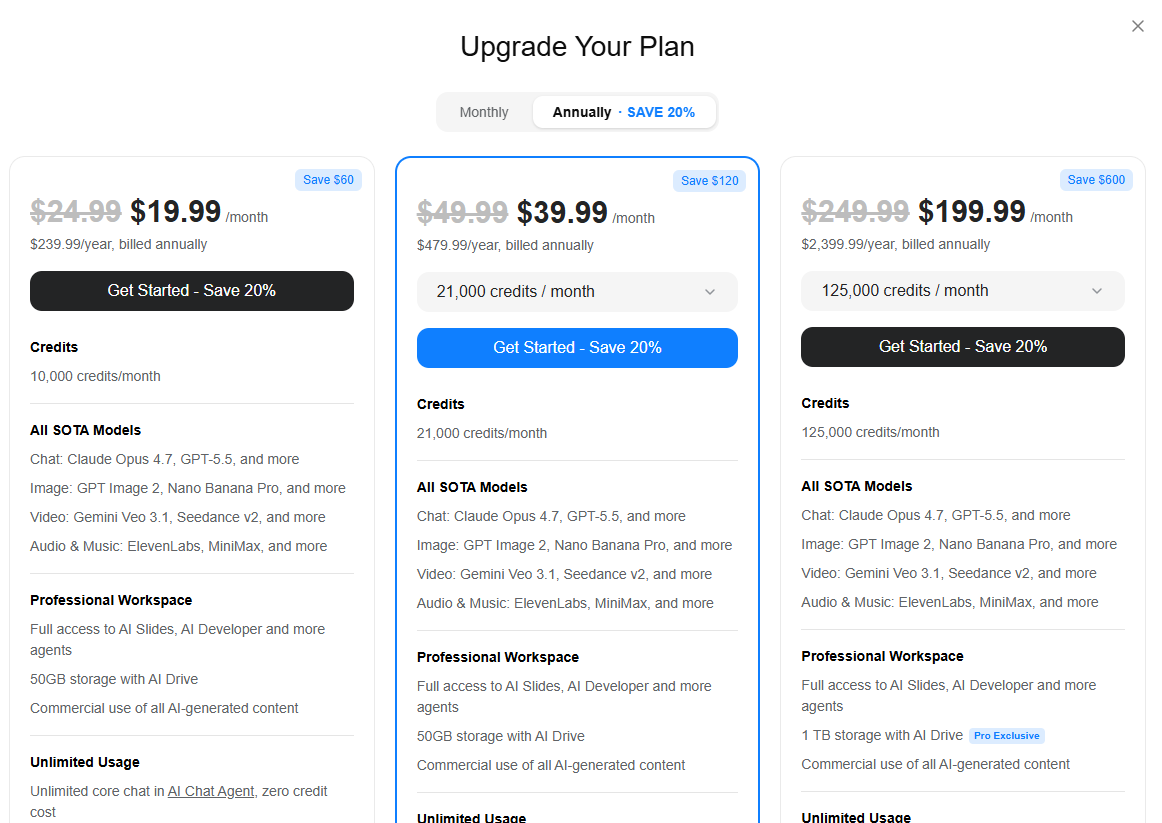
- Pricing is gated behind a login. There is no public pricing page. Once you sign in, three personal plans appear with no tier names, only dollar amounts.
- Plan 1 costs $19.99/month ($239.99/year) for 10,000 credits/month. Plan 2 is $39.99/month ($479.99/year) for 21,000 credits. Plan 3 is $199.99/month (discounted from $249.99) for 125,000 credits.
- The Team plan is $30/seat/month for 2-150 users, with 12,000 credits per seat per month. It is the only tier with admin controls, SSO/SAML, and centralized billing.
- Credits are shared across every task on the platform. Slide generation, research queries, image generation, video, and automated calls all draw from the same monthly pool. There is no way to ring-fence credits for presentations.
- Brand control is manual at every tier. No brand kit, no URL-based extraction, no persistent style settings. You re-specify your brand in prompts or clean it up manually on every deck.
- All current pricing is marked as valid until December 31, 2026, suggesting promotional rather than permanent rates. Renewal pricing is not stated publicly.
- Presentations.AI Starter is free, requires no credit card, supports unlimited users, and includes Brand Sync and .pptx export from day one.
If you have tried to find Genspark pricing without logging in, you already know the first problem: there is no public pricing page. You need to run a search on your search engine, click through to the pricing page, and then create an account to even see what anything costs.
And once you are inside, the three personal plans are listed only by price, with no tier names. That combination of friction and opacity makes it harder than it should be to evaluate Genspark against alternatives before committing.
This guide lays out exactly what each Genspark plan costs in 2026, what the credit model means for presentation workflows specifically, and how the pricing stacks up against Presentations.AI. The goal is to give you the information you need to make choices based on real usage needs rather than sticker price.
Genspark Overview
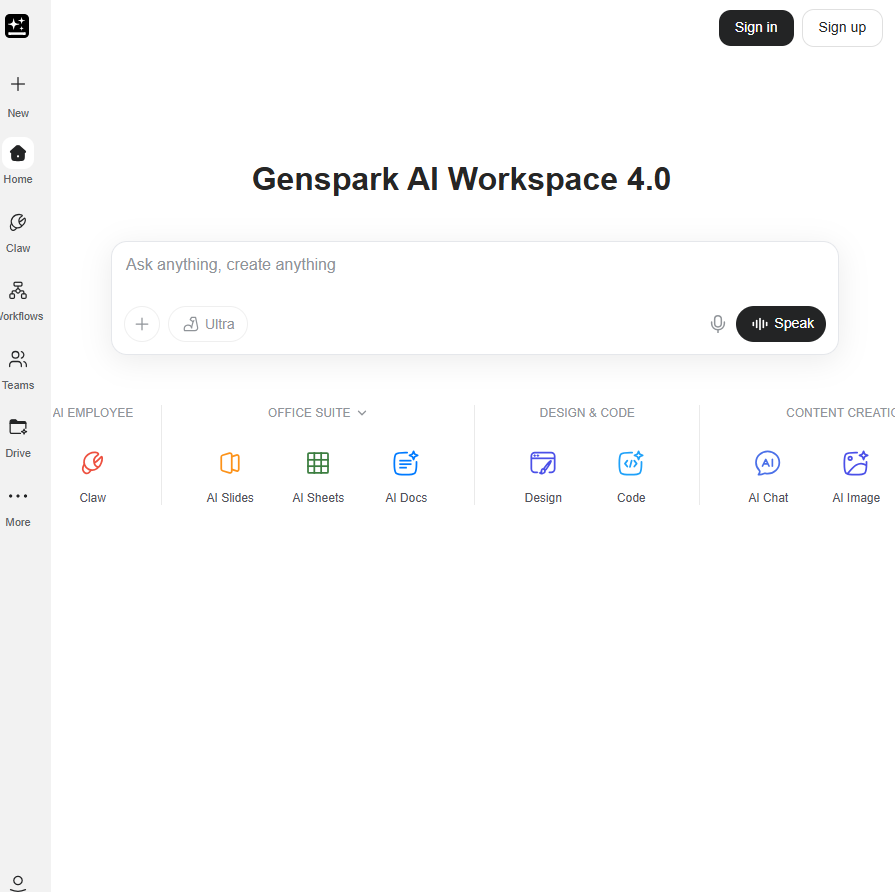
Genspark is a multi-agent AI workspace built on a network of specialized agents that coordinate to complete complex tasks. From a single prompt, it can generate slide decks, research briefs, websites, spreadsheets, videos, and automated phone calls. The multi-agent architecture gives it genuine depth on research-heavy tasks, pulling from multiple sources and synthesizing across them.
The platform is built for users who need a general-purpose AI workspace spanning many output types. Teams typically choose Genspark when they need research, content generation, and occasional slide creation from a single subscription rather than maintaining separate tools for each. Where it is less suited is for teams whose primary deliverable is presentations: the generalist architecture means design quality, brand control, and PowerPoint export are not the platform's core optimization.
Genspark Pricing Plans & What You Get
Genspark uses a credit-based pricing model where every action on the platform, from a research query to a slide deck to an automated phone call, draws from the same monthly credit pool. Understanding the credit math is as important as knowing the plan price, because the headline cost does not reflect what a high-volume presentation workflow actually consumes.
Plan breakdown (Free vs paid tiers)
The free plan gives you limited credits per day, enough to test the platform but not enough for sustained presentation production.
The three paid personal plans are unnamed on the pricing page and distinguished only by dollar amount and credit volume. All three paid tiers share the same feature set: access to all SOTA models, AI Slides, 50 GB of storage (1 TB on Plan 3), and unlimited chat and image generation at zero credit cost. What changes between tiers is purely credit volume and storage.
The Team plan is a separate tier with a different pricing logic and is the only option that includes admin controls and collaboration features:
AI usage limits and what counts as usage
Credits are the real pricing driver at Genspark, and the mechanics matter to anyone building presentations at scale. Every generative action draws from the monthly pool: slide generation, image creation, video, research tasks, website generation, and automated calls. Unlimited chat and unlimited image generation are carved out at zero credit cost on all paid plans, but those unlimited carve-outs apply specifically to the AI Chat Agent and AI Image Agent, not to generative actions inside other tools, including AI Slides.
A single 10-15 slide deck with supporting visuals is estimated to consume 250-450 credits. On Plan 1 with 10,000 monthly credits, that supports roughly 22-40 decks per month if every credit were used for presentations. In practice, any other Genspark usage competes for the same budget. There is no way to reserve or ring-fence credits specifically for slide work.
Exports, sharing, and branding
Genspark supports exporting slides and sharing via a link. The .pptx export fidelity for presentations specifically has not been confirmed as production-grade in independent coverage. Because Genspark is a general-purpose AI workspace rather than a presentation-native tool, the export pipeline is not optimized specifically for PowerPoint compatibility. For any workflow where the final file opens in Microsoft 365 on a recipient's machine, export quality should be tested directly before committing.
Brand control is manual at every tier, including the Team tier. There is no brand kit, no automatic brand extraction from a URL, and no persistent style settings for presentations. Every deck starts without brand context: you specify colors, fonts, and logo placement in the prompt, or apply them manually after generation. This is a structural limitation, not a plan-tier limitation. Upgrading does not change it.
Presentations.AI Overview
Presentations.AI is an AI-native presentation platform built for one job: helping teams create, refine, and deliver business decks efficiently. Unlike general-purpose AI workspaces, every part of the product is designed specifically around presentation workflows.
- Clip-E, the platform's conversational AI, handles the full creation and refinement cycle. You start a deck from a prompt, a PDF, a Word document, a URL, or raw pasted text, and then iterate through plain-language requests without leaving the conversation.
- Brand Sync auto-extracts your company's colors, fonts, and logo from your URL and applies them automatically across every deck.
- Anti-fragile templates adapt to content changes without breaking layout. And the .pptx export is engineered for real-world PowerPoint fidelity, not as a secondary output.
- Teams consistently choose Presentations.AI over general-purpose tools when their primary deliverable is a presentation, and brand consistency and export quality are non-negotiable. See the full Genspark vs. Presentations.AI comparison for a deeper feature breakdown.
Presentations.AI Pricing (For Comparison)
Presentations.AI uses a flat pricing model with no credit pool. You pay for a plan tier and use it without monitoring usage budgets or worrying about overage from unrelated feature types.
AI credits, templates, and collaboration
Presentations.AI does not use a per-task credit system for presentations. Clip-E is available throughout the workflow without a usage meter that tracks each generation, rewrite, or refinement request. Collaboration is included on the free Starter plan with unlimited users and no per-seat paywall.
The upgrade from Starter to Pro adds advanced templates, post-share analytics and tracking, priority AI processing, and SOC 2 Type II compliance. Enterprise adds SSO/SCIM and dedicated onboarding for organizations that need them. None of these upgrades are required to unlock core collaboration or brand features, which are available from the free tier.
Side-by-Side Comparison (Genspark vs. Presentations.AI)
Here is how the two platforms compare across the dimensions that affect your actual cost and workflow. The annual team cost row assumes 10 users, where the pricing gap is most visible.
Genspark vs. Presentations.AI: Which Has Better Pricing?
Headline price is only part of the story. The more useful question is: which tool delivers better value for the specific job of making presentations, at what total cost, and with what operational overhead?
Best for fast, flexible creation
Genspark generates a first draft quickly, and its research depth gives content a solid informational foundation. Presentations.AI is also fast to a first draft, and the path from draft to finished deck is shorter because Clip-E stays in the conversation for revisions. For any deck that goes through more than one round of input, Presentations.AI's iterative model reduces total time from brief to delivery.
Best for brand control and consistent design
Presentations.AI wins clearly here. Brand Sync automatically extracts your brand from your company URL and applies it to every deck, without manual setup. Genspark has no equivalent feature at any tier.
Best for teams and collaboration
Presentations.AI includes collaboration on the free Starter plan with unlimited users. Genspark gates all team features behind the Team plan, which costs $30 per seat per month. A 10-person team pays $3,600 per year on Genspark versus $240 per year on Presentations.AI Pro.
Hidden costs and gotchas to watch
The two most common surprises in the Genspark pricing model are credit depletion and pricing impermanence. On credit depletion: if your team has a high-output month, the shared credit pool can run low before the billing cycle resets.
There is no way to see in advance how much of the monthly budget will go to presentations versus other tasks. Regarding pricing: all current Genspark plans are valid until December 31, 2026. That means the prices you see today may not reflect what you will pay when your plan renews. The renewal terms are not published.
How to Choose the Right Plan
The right plan depends on three practical factors: how often you create presentations, how important brand consistency is to your workflow, and whether multiple people need access to a shared workspace.
If you're just testing
Start with Presentations.AI Starter (free, no credit card). You get Clip-E, Brand Sync, multi-format input, and .pptx export with no time limit and no daily credit cap. It is a fully functional free plan, not a trial.
If you also want to evaluate Genspark's broader capabilities, the free tier gives you limited daily credits to explore the workspace. The key difference at this stage: Presentations.AI's free plan is designed to produce finished, usable decks. Genspark's free tier is designed to sample the platform.
If you create decks every week
For consistent weekly output, Presentations.AI Pro at $240/year is the clearer choice for presentation-focused teams. It covers unlimited users with no credit math, full .pptx fidelity, analytics and tracking, and SOC 2 compliance.
On the Genspark side, Plan 1 at $19.99/month ($239.88/year) gives 10,000 credits, but those credits are shared across everything you do on the platform. For a team producing 10-15 decks per month alongside other Genspark tasks, credit depletion before the billing cycle ends is a real planning risk.
If you need a team workflow
For team governance, Genspark's Team plan at $30/seat/month provides SSO/SAML, admin controls, usage analytics, and centralized billing. These are genuine organizational features. But it does not add brand governance. Presentations.AI Enterprise includes SSO/SCIM, brand-level controls, and dedicated onboarding.
For teams where the primary challenge is consistent, on-brand presentation output across multiple users, rather than general AI governance, Presentations.AI Enterprise addresses the actual problem. And for teams that simply need shared access without governance requirements, Presentations.AI Starter handles that at no cost.
Pricing Decisions For Your Business
Genspark fits best for teams that genuinely need a multi-purpose AI workspace and are comfortable with a credit-based model that shares budget across research, slides, video, and everything else the platform does. If occasional presentations are a secondary output alongside those other workflows, the pricing can work. Just factor in the December 31, 2026, expiry on current rates, the absence of brand control at every tier, and the opacity of a login-gated pricing page before you commit.
Presentations.AI fits best for teams where presentations are the primary deliverable and brand consistency, export fidelity, and iterative AI matter. The free Starter plan removes the evaluation risk entirely: you build a real deck, see the output quality, and decide. Pro at $240/year covers unlimited users with no credit tracking. Enterprise adds governance for organizations that need it. For a full comparison, see the Genspark vs. Presentations.AI comparison page.