TL;DR
- Beautiful.ai’s Smart Slides system handles design automatically, saving time but limiting creative control.
- Pricing starts at $12/month (billed annually) for individuals. Team plans jump to $40/user/month, which adds up fast for growing organizations.
- There is no free plan. Only a 14-day trial that requires a credit card and auto-renews into an annual subscription.
- User reviews on G2 and Capterra praise its speed and polish. But Trustpilot reviews are more polarized, with recurring complaints about billing practices and limited customization.
- If you need deeper AI-driven content generation, brand sync, and a conversational AI assistant that helps you build and refine decks, Presentations AI offers more for the price.
Beautiful.ai is a cloud-based presentation tool that uses AI-powered "Smart Slides" to automate layout, spacing, and alignment as you build your deck. It's positioned as a faster, easier alternative to PowerPoint for professionals who want polished slides without the design effort.
Since its launch, it has built a solid user base among consultants, marketers, sales teams, and startup founders. But in 2026, the AI presentation space is more crowded than ever. Tools like Presentations AI, Gamma, and Canva are all competing for the same audience.
So the real question is: Does Beautiful.ai still hold up? This review covers features, pricing, real user feedback, and its comparison with Presentations AI, so you can decide whether it's the right fit for your workflow.
Quick Verdict
Score: 7.5/10
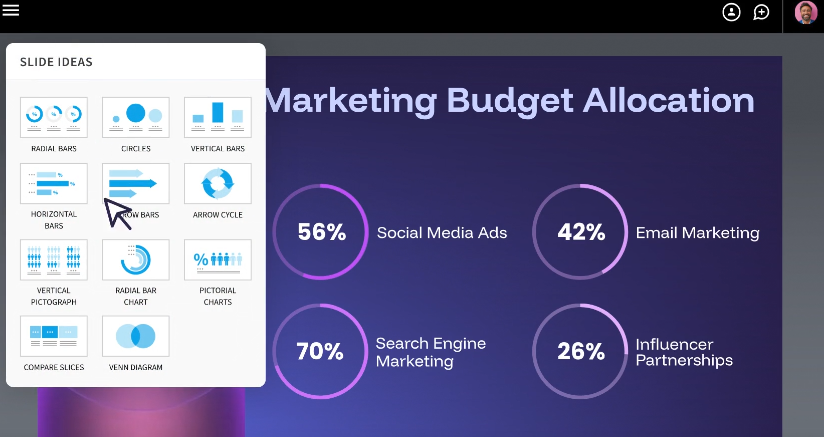
Beautiful.ai does one thing well: it makes average presenters look good, fast. The auto-layout engine is genuinely useful, and the learning curve is minimal. But the lack of a free plan, rigid Smart Slide templates, and a pricing jump between Pro and Team tiers hold it back from being a complete solution for most teams.
Best for:
- Solo consultants and freelancers who create client-facing decks regularly and want consistent, clean output without hiring a designer.
- Sales teams need to update pitch decks quickly and track viewer engagement through built-in analytics.
- Non-designers in marketing, HR, or L&D roles who want professional slides without learning complex tools.
- Startup founders building investor decks or board presentations on a tight timeline.
Quick look at Beautiful.ai
G2: 4.7/5 (192 reviews) | Capterra: 4.2/5 (85 reviews) | Trustpilot: 3/5 (212 reviews)
Starting price: $12/month (Billed annually)
Free plan: None. 14-day trial (Credit card required)
Best for: Non-designers who need fast, polished decks
Biggest limitation: Rigid layouts and limited AI depth compared to newer tools
Not ideal for
- Teams that need granular design control over element placement, animations, or slide structure. Smart Slides enforce layout rules that can feel restrictive.
- Organizations with strict brand requirements beyond basic color and font settings. The Brand Kit feature covers fundamentals, but deeper customization is limited.
- Budget-conscious teams. The Team plan at $40/user/month adds up significantly for organizations with more than a handful of seats.
- Users who need strong AI content generation. Beautiful.ai's AI assists with drafts and outlines, but it doesn't research topics or generate deeply contextual content the way newer tools do.
- Anyone who needs heavy data visualization. Complex charts, tables, and data-dense slides are not Beautiful.ai's strength.
What is Beautiful.ai (And How It's Different)
Beautiful.ai's core differentiator is its "Smart Slides" system. Instead of giving you a blank canvas where you manually drag, resize, and align every element, Beautiful.ai provides intelligent templates that automatically adjust their layout as you add or remove content.
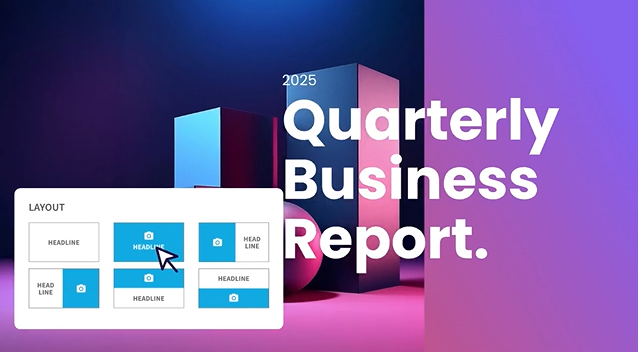
Add a bullet point, and the spacing recalibrates. Drop in an image, and the text reflows around it. Remove a chart, and the remaining elements redistribute. The idea is that you never have to think about formatting. You focus on content; the tool handles design.
This is fundamentally different from tools like PowerPoint or Google Slides, where every formatting decision is manual. It's also different from fully AI-generative tools like Presentations AI, which go beyond layout and actually draft content, research topics, and build entire decks from a prompt.
Beautiful.ai sits in between: it's smarter than a traditional slide editor, but less autonomous than a full AI presentation maker. That middle ground works well for people who already know what they want to say and just need help making it look good.
Key Features That Matter in Real Work
Smart slide layouts (Auto design)
This is the flagship feature. Every slide type in Beautiful.ai comes with built-in design intelligence. As you add text, images, charts, or icons, the layout adjusts in real time to maintain visual balance. Spacing, alignment, and hierarchy are handled automatically.
On G2, users consistently highlight this as the biggest time-saver. Multiple reviewers report cutting design time by 50%-75% compared to PowerPoint. For recurring deck types like weekly reports or quarterly updates, the efficiency gains compound quickly.
The trade-off is control. You cannot freely drag elements to arbitrary positions on the slide. The Smart Slide system decides where things go based on its internal rules, and while those rules usually produce clean results, they can feel rigid when you have a specific layout in mind.
Templates and slide types
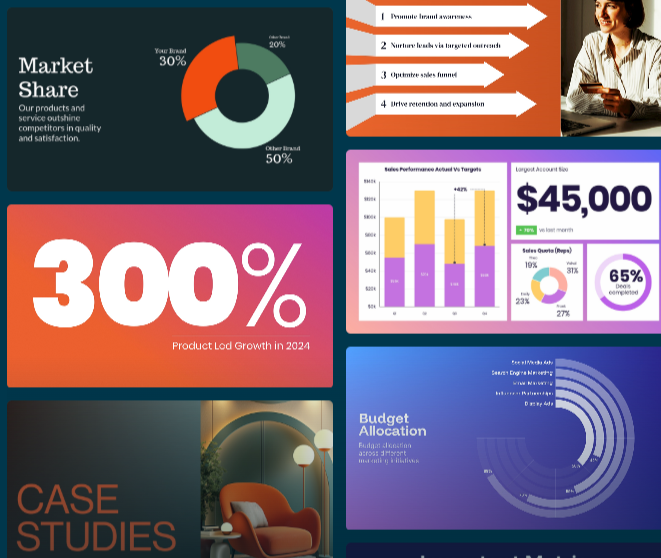
Beautiful.ai offers a library of smart templates organized by use case: pitch decks, project updates, training materials, marketing plans, and more. Each template includes multiple pre-built slide types (timelines, comparison grids, data charts, team bios, etc.) that maintain the Smart Slide behavior.
The templates are well-designed and consistently professional. However, several users across G2 and Capterra note that the template library has been slow to expand. Some long-term users report seeing largely the same options over extended periods. For teams that produce a high volume of decks, the visual variety can start to feel limited.
Team collaboration
On the Team and Enterprise plans, Beautiful.ai supports real-time co-editing similar to Google Docs. Multiple users can work on the same deck simultaneously, leave comments on specific slides, and track version history. Role-based permissions let admins control who can edit versus view.
The collaboration features are functional and generally reliable, though some users on G2 and Capterra report occasional bugs when multiple editors are active simultaneously.
The Pro plan does not include collaboration. If you're working solo, that's fine. But if even two people need to co-edit decks, you're looking at the Team plan, and that pricing jump from $12/month to $40/user/month is significant.
Brand controls (themes, fonts, colors)
Beautiful.ai's Brand Kit feature (available on Team and Enterprise plans) lets you store your company's logos, color palettes, fonts, and footer styles in a centralized library. When team members create new presentations, these brand elements apply automatically.
Updates to the Brand Kit propagate across all presentations that use it, eliminating the common problem of outdated brand elements lingering in old decks. For enterprises managing multiple brands or client identities, Beautiful.ai supports multiple Brand Kits within a single organization.
The brand controls cover the essentials well. Where they fall short is in enforcing more nuanced brand guidelines, such as specific layout structures, mandatory slide sequences, or detailed visual rules that go beyond colors and fonts.
Assets and visual library
Beautiful.ai includes a built-in library of stock photos, icons, and videos that you can add to slides without leaving the editor. This removes the friction of searching for visuals externally and manually importing them.
The stock library is serviceable for most business presentations. It won't replace a dedicated design resource for brand-specific imagery, but it's more than enough for internal decks, training materials, and general-purpose presentations.
Export and sharing options
You can share Beautiful.ai presentations via a link (with viewer analytics tracking) or export to PowerPoint and PDF. The link-sharing option includes engagement metrics such as who viewed the deck, time spent per slide, and completion rate, which are particularly useful for sales teams tracking prospect engagement.
PowerPoint export is a noted pain point in user reviews. Several users on Capterra and Reddit report that exported files can have formatting issues: text that was a single block in Beautiful.ai sometimes breaks into individual text boxes in PowerPoint, and alignment can shift. If your workflow requires delivering editable PowerPoint files to clients, test the export quality before committing to it.
AI Capabilities (What It Can and Can't Do)
AI for outlines and slide drafts
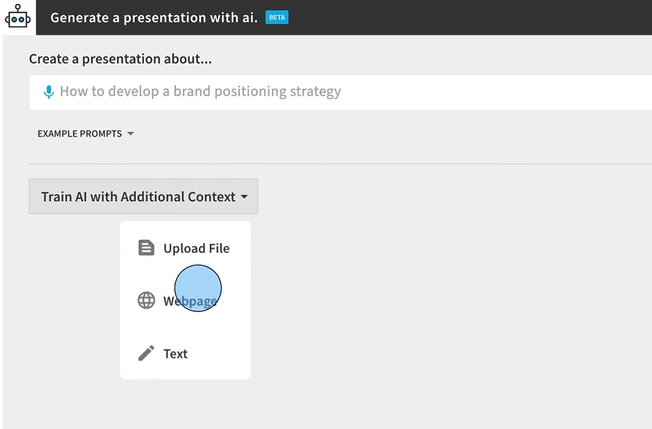
Beautiful.ai's DesignerBot can generate a full presentation draft from a text prompt. You describe what you need, and the AI creates an outline and populates slides with content. It's a useful starting point that can save significant time compared to building from scratch.
The output is typically well-structured and logically organized. For straightforward deck types like company overviews, project updates, or sales pitches, the first draft is often 70-80% usable with some editing.
AI for rewriting and content polishing
Once you have content on a slide, the AI can help rewrite text for clarity, shorten verbose copy, or adjust tone. This helps tighten messaging on individual slides without manually reworking everything.
Where AI still struggles
Beautiful.ai's AI is primarily a layout and drafting assistant. It doesn't research topics on the web, pull in real-time data, or generate deeply contextual content based on your specific business.
Several users across G2 and Reddit note that AI-generated content can feel generic, especially for specialized or technical topics. The AI also doesn't add new slides to an existing deck after the initial generation; once the first draft is created, additional slides require manual work.
For teams that need an AI partner capable of understanding context, researching topics, and iterating on content conversationally, tools like Presentations AI (with its Clip-E assistant) offer a more advanced AI experience.
Beautiful.ai 定价概览
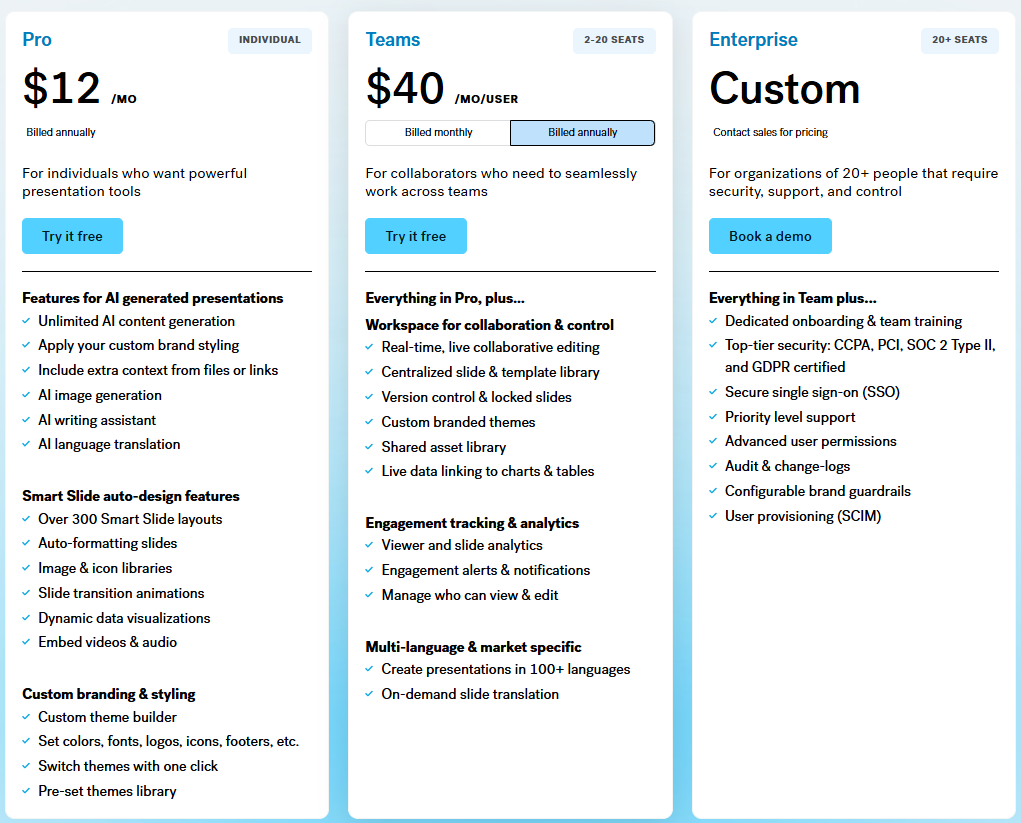
Beautiful.ai 采用三级订阅模式。
定价通常取决于哪些因素
主要的定价驱动因素包括:用户数量(个人用户与团队用户)、计费频率(按年计费与按月计费),以及所需的品牌控制和协作功能级别。
最大的成本差异在于专业版(专为个人用户设计)和团队版(专为团体设计)之间。从个人使用转向即使是小型团队,每用户成本也会增加两倍以上。
提供按月计费选项,但费用更高。专业版从每月12美元(按年计费)跃升至每月45美元(按月计费)。团队版则从每用户每月40美元(按年计费)增至每用户每月50美元(按月计费)。
此外,还有一个一次性选项,支付45美元可制作一份演示文稿,这可能适合有一次性项目的用户。
高级别通常包含的功能
团队版增加了集中式品牌控制、共享资产库、实时协作、参与度分析和管理工具。企业版在此基础上提供了SSO、SCIM配置、专属客户经理、优先支持和高级安全功能。
专业版包含无限幻灯片、AI内容生成、智能幻灯片、自定义字体、PowerPoint/PDF导出和观众分析。对于不需要协作的个人用户来说,专业版能满足大部分需求。
专业版和团队版均提供14天免费试用。试用需要绑定信用卡,如果在试用期结束前未取消,将自动转为付费年度订阅。这是在Trustpilot和Product Hunt上反复出现的投诉,许多用户反映因忘记取消而被收取了一整年的费用。
易用性与编辑体验
你能多快制作出高质量的演示文稿?
这正是Beautiful.ai真正出彩的地方。多个评论平台的用户反映,他们可以在不到一小时内将想法转化为一份可展示的演示文稿。对于那些以前花半天时间与PowerPoint排版搏斗的人来说,节省的时间是真实且立竿见影的。
智能幻灯片和预设模板的结合意味着你永远不会从空白屏幕开始。选择幻灯片类型,添加你的内容,设计会自动完成。对于像每周例会或月度报告这样的重复性演示文稿,团队可以在通常所需时间的一小部分内生成一致的成果。
灵活性与模板规则
让Beautiful.ai快速的同一系统,也是其对高级用户最大的限制。你无法自由移动幻灯片上的元素。当智能幻灯片布局逻辑做出你不认同的决定时,你无法覆盖它。
对于大多数商务演示文稿来说,这种限制实际上是一个优点。它避免了糟糕的设计决策,并使输出始终保持专业水准。但对于那些想要对幻灯片进行像素级控制,或者需要为特定用例创建高度自定义布局的用户来说,这种僵化可能会令人沮丧。
正如一位G2评论者所说,智能幻灯片系统是该平台最好也是最糟糕的地方。它很好地处理了90%的设计决策,但当你不同意剩下的10%时,却无法覆盖它们。
Beautiful.ai的实际应用场景
销售演示文稿和推介
Beautiful.ai非常适合销售团队。简洁的布局、方便进行临时修改的快速编辑功能,以及用于追踪潜在客户参与度的观众分析功能,使其成为那些需要看起来精美但又不想花费数小时准备时间的推介演示文稿的可靠选择。
公司更新和内部演示文稿
对于像领导层更新、部门评审或董事会演示文稿这样的重复性内部演示,Beautiful.ai的一致性是一个主要优势。模板确保每次更新都遵循相同的视觉结构,节省时间,并让利益相关者专注于内容而非格式更改。
营销和活动演示文稿
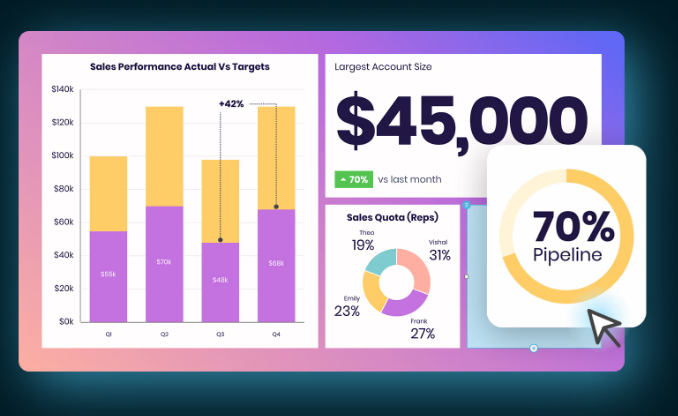
营销团队受益于快速生成初稿的能力。营销方案、发布计划和创意简报可以快速地与专业视觉效果结合。内置的图库为图片素材的获取提供了便利。
培训和入职演示文稿
学习与发展(L&D)团队从可重复使用的模板系统中获得价值。需要大规模制作的培训演示文稿(新员工入职、合规培训、产品演示)可以在整个组织内实现标准化,同时将设计成本降至最低。
Beautiful.ai 的优缺点
优点
- 对于非设计师而言,能将想法快速转化为精美演示文稿。智能幻灯片系统省去了繁琐的格式调整工作。
- 每次都能输出一致、专业的成果。几乎不可能制作出难看的幻灯片,这对于设计技能参差不齐的团队来说是一个真正的优势。
- 共享演示文稿的观众分析功能可提供可操作的互动数据,尤其适用于销售工作流程。
- 团队版计划中的实时协作功能,在共同编辑和反馈循环方面运行流畅。
- 内置的图库和图标集减少了对外部素材的需求。
- 支持PowerPoint导出,意味着最终交付时您不会被平台锁定(尽管导出保真度有所不同)。
缺点
- 没有免费套餐。14天试用期需要绑定信用卡,并会自动续订为年度订阅,这在Trustpilot和Product Hunt上引发了大量投诉。
- 设计灵活性有限。智能幻灯片强制执行无法覆盖的布局规则,这让需要自定义或非常规幻灯片设计的用户感到沮丧。
- 从专业版(每月12美元)到团队版(每用户每月40美元)的价格跳跃幅度很大。即使是一个五人小团队,每年也需要支付2400美元。
- AI功能不如新兴竞争对手。Beautiful.ai的AI有助于草稿和布局,但不能进行研究、对话式迭代或生成深度上下文内容。
- 模板库扩展缓慢。长期用户反映,随着时间的推移,模板种类有限。
- PowerPoint导出可能会出现格式问题,包括文本框损坏和对齐偏移。
- 在200多条评论中,Trustpilot评分为3.1/5,计费方式和客户支持响应速度是反复出现的问题。G2(4.7/5)和Capterra(4.3/5)描绘了更积极的画面,但Trustpilot上的投诉值得关注。
Beautiful.ai 对比 Presentations AI:2026年哪款AI演示工具更胜一筹?
两款工具都旨在通过AI让演示文稿创建更快、更简单,但它们采取了不同的方法。Beautiful.ai是一款以设计为中心的编辑器,辅以AI协助。Presentations AI则是一个AI优先的平台,人工智能驱动整个创建过程。
有关与Presentations AI相比的详细功能分析,请参阅我们的 Beautiful.ai 比较页面.
哪个更适合快速起草?
在此方面,Presentations AI 更胜一筹。它的AI可以通过简单的提示、URL、PDF或Word文档生成完整的演示文稿。对话式AI助手(Clip-E)允许您使用自然语言对演示文稿进行精炼和迭代,从而通过对话完成最终产品。如果您想体验不同之处,我们的 免费AI演示文稿制作工具 让您无需信用卡即可开始使用,这与Beautiful.ai需要预付支付信息才能使用的14天试用期有着显著区别。
Beautiful.ai的DesignerBot也能根据提示生成草稿,但其过程更偏向模板驱动,对话性较弱。一旦初始草稿创建完成,添加新的AI生成幻灯片就需要变通方法。Presentations AI将AI视为持续的协作者,而不仅仅是启动工具。
哪个更适合品牌一致性?
Presentations AI专有的品牌同步功能会自动将您的演示文稿与品牌的颜色、标志和风格保持一致。它旨在在创建时就保持品牌一致性,而不仅仅是通过手动主题设置。在底层,我们的 AI幻灯片创建器 在生成过程中逐张幻灯片应用品牌规则,而不是事后作为手动主题叠加层,这就是为什么即使您稍后编辑内容或添加幻灯片,输出也能保持一致的原因。
Beautiful.ai的品牌工具包功能涵盖了基本要素(颜色、字体、标志、页脚),并在所有演示文稿中传播更新。对于基本的品牌执行来说是可靠的,但它依赖于用户选择正确的工具包,而不是AI自动应用品牌规则。
对于要求每份演示文稿都必须在无需手动干预的情况下反映品牌标准的团队而言,Presentations AI的方法更省心、更一致。
哪个更适合团队?
Beautiful.ai在其团队计划中提供了更成熟的协作功能:包括实时共同编辑、评论、版本历史、基于角色的权限和共享资产库。这些功能构建精良,适用于日常团队工作流程。
Presentations AI支持共享、实时同步和访问控制,其AI助手可供每位团队成员使用,这是一项额外优势。这种协作体验更侧重于AI辅助创作,而非传统的文档共同编辑,任何用户无论技能水平如何,都能制作出专业的成果。
正确的选择取决于您团队的工作流程。如果共同编辑和版本控制至关重要,那么Beautiful.ai的团队计划是更稳妥的选择。如果您的首要任务是让每位团队成员都能独立制作高质量的演示文稿,那么Presentations AI的AI优先方法将使竞争环境更加公平。
值得考虑的最佳替代方案
如果您需要更多设计控制
Canva 拥有更庞大的模板库,并允许用户完全控制元素的放置、图层和自定义。它更适合那些既需要设计灵活性又注重易用性的团队。对于需要像素级控制和深度动画功能的用户来说,PowerPoint 仍然是标准选择。
如果您需要更强大的AI优先工作流程
Presentations AI 凭借其对话式AI助手、多格式导入(URL、PDF、Word)和AI驱动的品牌规范执行,在此类别中处于领先地位。Gamma 是另一个强有力的选择,它提供慷慨的免费套餐、原生网页输出以及能够研究和迭代内容的AI代理。在将AI用作真正的共同创作者而非布局助手方面,两者都比 Beautiful.ai 更进一步。
如果您需要企业级控制
对于需要SSO、SCIM、审计跟踪和高级管理控制的大型组织,Beautiful.ai 的企业版计划可以满足这些需求。Presentations AI 也支持企业级功能。对于已经融入微软生态系统的团队,带有 Copilot 的 PowerPoint 可以与现有的安全和合规基础设施原生集成。
如何选择(简单清单)
如果符合以下情况,请选择 Beautiful.ai:
- 您每周或更频繁地创建演示文稿,并希望在无需任何设计工作的情况下获得一致、专业的输出。
- 如果您的团队规模较小(少于5个席位)或您独立工作,专业版计划即可满足您的需求。
- 您重视观众分析,以便跟踪潜在客户或利益相关者如何与您的演示文稿互动。
- 您的品牌要求简单明了(颜色、字体、徽标),且不需要深度定制。
如果符合以下情况,请选择 Presentations AI:
- 您希望AI不仅仅是布局,还需要它起草内容、研究主题,并以对话方式迭代您的演示文稿。
- 品牌一致性是您的优先事项,并且您希望通过AI自动执行,而不是通过手动选择主题。
- 您正在寻找一个免费的起点,以便在承诺年度订阅之前测试该平台。
- 您的团队中有非设计师,他们需要独立制作专业的演示文稿,而不完全依赖模板。
如果出现以下情况,请选择其他方案:
- 您需要完全的设计自由和像素级控制(请选择 Canva 或 PowerPoint)。
- 您想要一个提供丰富 AI 功能的免费套餐(可以考虑 Gamma)。
- 您深度融入微软生态系统并需要原生集成(例如带有 Copilot 的 PowerPoint)。
哪款最适合您的企业?
Beautiful.ai 是一款可靠的工具,专为特定任务而生:无需设计技能,即可将内容快速转化为简洁专业的演示文稿。其智能幻灯片系统在消除格式排版上的繁琐工作方面确实有效,对于经常制作演示文稿的独立专业人士或小型团队而言,节省的时间非常可观。
它的不足之处在于灵活性、AI 深度以及团队定价。其僵化的布局系统让高级用户感到沮丧。与新兴的、AI优先的工具相比,其AI功能有限。而从每月12美元(专业版)跃升至每用户每月40美元(团队版)的定价,对于成长型组织来说过于昂贵。
如果您的主要需求是快速制作出精美的演示文稿,并且您能接受其设计限制,那么 Beautiful.ai 就能满足您的需求。如果您想要一个AI伙伴,能够为您的团队制作的每一份演示文稿进行研究、起草、优化并保持品牌一致性,那么 Presentations AI 能以更具竞争力的价格提供更全面的解决方案。
如果您想亲自验证这一说法, Presentation ai 的免费入门级套餐无需任何费用,无需信用卡信息,并支持同一工作区内的无限用户。