Em resumo
- Slides gerados por IA sempre precisam de uma revisão humana. Uma apresentação que parece pronta não é o mesmo que uma apresentação precisa.
- Excesso de texto é o sinal mais visível de uma apresentação de IA não editada. Uma ideia clara por slide é a regra.
- Se os seus slides parecem um modelo emprestado, a consistência do design é o problema.
- A IA pode "alucinar" estatísticas e fazer afirmações confiantes que não se sustentam. Verifique cada ponto de dado antes de apresentá-lo.
- Ferramentas como Presentations.ai reduzem a maioria desses problemas por padrão, através de layouts inteligentes, Brand Sync e edição conversacional.
Por que as Ferramentas de Apresentação de IA Produzem Erros Previsíveis
As ferramentas de apresentação de IA mudaram a velocidade com que se pode ir de uma página em branco para uma apresentação com aparência finalizada. Mas a velocidade também esconde um problema. Como os slides gerados por IA parecem polidos logo de cara, você pode ser tentado a pular a etapa de edição.
A apresentação tem estrutura, elementos visuais e um fluxo lógico, então parece pronta. Então eles a apresentam, e em algum lugar no meio da sala, enquanto ficam em silêncio, percebem que afinal não estava tão pronta.
Os erros que as pessoas cometem com apresentações de IA são previsíveis. Eles não são aleatórios e não são sua culpa. São o resultado natural de como essas ferramentas funcionam e para o que foram otimizadas. Uma vez que você sabe o que procurar, as correções são rápidas. Este post aborda os sete mais comuns e mostra como corrigir cada um antes da sua próxima apresentação. Se você quiser ver como é uma boa criação de slides assistida por IA desde o início, Presentations.ai vale a pena conferir.
Toda ferramenta de apresentação de IA funciona de forma semelhante nos bastidores. Você fornece um prompt; ela gera conteúdo de slide com base em padrões que aprendeu de um grande conjunto de dados e, em seguida, aplica um layout visual a esse conteúdo.
O que ela não pode fazer é entender seu público, verificar suas próprias afirmações, decidir o que mais importa em seu contexto específico ou fazer julgamentos sobre ênfase e tom.
Então você precisará fazer uma breve revisão de edição antes de compartilhar a apresentação. Se você está procurando uma ferramenta projetada para minimizar esses padrões desde o início, nossa Criador de Apresentações de IA incorpora padrões inteligentes que reduzem os problemas mais comuns antes mesmo de você começar a editar.
7 Erros Comuns ao Escrever Prompts para Ferramentas de Apresentação de IA
O ponto em comum ao escrever prompts é ser o mais específico possível, minimizando assim a margem para erros ou interpretações errôneas.
Erro 1: Dar um Prompt Vago à IA
É aqui que a maioria das apresentações ruins de IA começa. Alguém digita "Faça uma apresentação sobre nosso produto" ou "crie um deck sobre os resultados do 3º trimestre" e clica em gerar. A ferramenta faz o seu melhor, mas quase não tem contexto real para trabalhar. O resultado acaba sendo genérico porque a entrada foi genérica.
As ferramentas de IA não leem mentes. Elas produzem um resultado melhor quando você lhes dá um material bruto melhor. A diferença entre um prompt vago e um específico não é uma questão de comprimento. É uma questão de detalhe.

O Clip-E do Presentations.ai pede mais contexto antes de gerar uma apresentação
A solução
Antes de digitar seu prompt, responda a três perguntas:
- Quem verá esta apresentação?
- O que eles já sabem e o que precisam decidir?
- O que eles devem fazer após o último slide?
Insira essas respostas no seu prompt. Um prompt como "Crie um deck de 10 slides para um VP de Vendas avaliando duas opções de fornecedores. O público conhece nossa indústria, mas não nosso produto. O objetivo é agendar uma demonstração até o final da semana" produzirá resultados melhores do que uma frase curta.
Erro 2: Não Editar o Resultado
Este é o erro mais comum, e ele agrava todos os outros desta lista. Os slides gerados por IA parecem polidos. Eles têm layouts limpos, estrutura razoável e visuais que parecem adequados. Então, as pessoas presumem que o trabalho está feito e compartilham o deck sem tocá-lo.
Um deck pode ter um design visual profissional e ainda conter frases vazias, suposições erradas sobre seu público, uma abertura fraca e um slide de encerramento que não diz nada útil. Nada disso aparece à primeira vista.
A solução
Inclua uma breve revisão no seu processo após cada geração de IA. Não precisa ser longa. Dez minutos são suficientes para um deck padrão se você souber o que procurar. Leia o slide de abertura e pergunte se faria sentido para alguém que não sabe nada sobre sua empresa.
Leia o slide de encerramento e verifique se ele contém uma ação específica. Analise cada ponto e remova aqueles que não adicionam nada que seu público não pudesse ter adivinhado por conta própria. Apenas essas três verificações melhorarão significativamente a maioria dos decks gerados por IA.
Erro 3: Sobrecarga de Slides com Texto
As ferramentas de IA tendem à exaustividade. Quando você lhes dá um tópico complexo, elas tentam cobri-lo completamente, o que significa que elas enchem os slides com pontos. O resultado é um deck onde cada slide parece um relatório escrito que alguém acidentalmente transformou em uma apresentação.
Slides cheios de texto não comunicam de forma mais eficaz do que slides com menos texto. Eles comunicam de forma menos eficaz porque sua audiência está lendo em vez de ouvir, e eles ficam para trás ou perdem o interesse. Uma apresentação não é um documento. Os dois formatos servem a propósitos diferentes.
A solução
Aplique a regra de uma ideia por slide. Cada slide deve conter um ponto claro. Se um slide tem quatro ou cinco marcadores, pergunte qual é a única coisa que você mais quer que sua audiência se lembre. Isso se torna o título principal. Os outros pontos são cortados, ganham seu próprio slide ou vão para suas anotações do orador. Se você se pegar lendo o texto do slide em voz alta, palavra por palavra, durante uma apresentação, isso é um sinal de que o conteúdo pertence às anotações, não ao slide. Um Criador de Slides com IA construído em torno da regra de uma ideia por slide resistirá automaticamente ao excesso de texto, gerando uma única mensagem focada por slide em vez de despejar cada marcador em um bloco de texto.
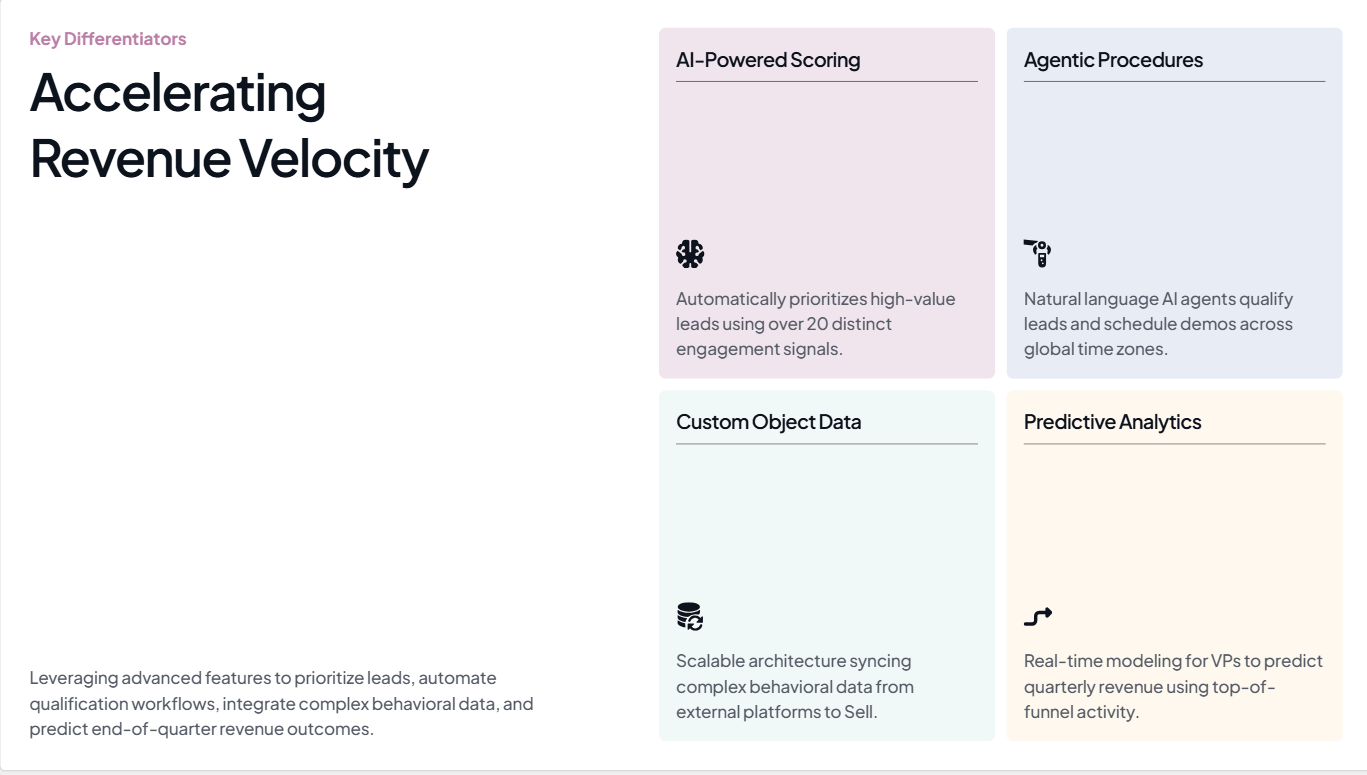
Neste slide gerado por Presentations.ai, a ideia chave é acelerar a velocidade da receita
Fonte
Erro 4: Ignorar a Consistência do Design
Uma reclamação comum sobre apresentações geradas por IA é que elas parecem um modelo emprestado, e não algo que veio da sua empresa. As cores estão um pouco erradas. As fontes não correspondem à sua marca. O logotipo está no primeiro slide e em nenhum outro lugar. No terceiro slide, a apresentação já parece pertencer a outra pessoa.
Isso acontece porque a maioria das ferramentas de apresentação de IA não sabe nada sobre sua marca, a menos que você as informe. Elas aplicam qualquer tema visual padrão que possuam, o que pode parecer limpo, mas não carrega nenhuma identidade de marca. Quando sua apresentação chega a um tomador de decisões que nunca o conheceu, essa falta de identidade é um problema.
A solução
Antes de gerar qualquer coisa, certifique-se de que sua ferramenta conheça sua marca. No mínimo, isso significa especificar suas cores primárias e fonte, e fornecer seu logotipo. Se você estiver ajustando isso manualmente após a geração, reserve alguns minutos extras para revisar cada slide e garantir que o estilo visual seja consistente do início ao fim. Preste atenção aos conjuntos de ícones, tom das imagens e tratamentos de fundo, pois estes tendem a variar slide a slide na saída da IA.
Erro 5: Confiar em Fatos Gerados por IA Sem Verificá-los
Ferramentas de IA gerarão estatísticas, dados de mercado e citações de pesquisa com total confiança. Alguns desses números são precisos. Muitos não são. O problema é que não há diferença visível entre os reais e os fabricados na saída. Eles ficam lado a lado no mesmo slide, formatados de forma idêntica, sem nenhuma indicação de quais você pode realmente apresentar em uma reunião.

Sempre verifique os números que você vê em apresentações geradas por IA
Fonte
Apresentar uma estatística "alucinada" diante de uma sala que inclui alguém que conhece o número real é uma experiência desconfortável. Apresentar uma em uma reunião de diretoria ou em um pitch para investidores é pior. Isso levanta questões sobre todas as outras afirmações em sua apresentação, não apenas sobre aquela que se revelou errada.
A solução
Trate cada estatística gerada por IA como um marcador de posição. Durante sua revisão, abra uma aba do navegador e verifique cada dado em uma fonte primária. Se não conseguir encontrar a fonte em 30 a 60 segundos, substitua o número por uma linguagem que você possa realmente defender. "Significativamente mais rápido" sem uma porcentagem específica não é tão impressionante, mas é muito mais seguro do que uma porcentagem que não se sustenta. Para qualquer slide de dados que seja importante, forneça os números você mesmo, em vez de pedir à IA para inventá-los.
do Presentations.AI editor facilita a troca dos seus dados verificados sem quebrar o layout. Experimente gratuitamente.
Uma nota sobre verificação de fatos
Este é o único erro que nenhuma ferramenta de IA resolve completamente hoje. A etapa de verificação é sempre sua. O que uma boa ferramenta pode fazer é facilitar a edição de slides individuais e a troca dos seus dados verificados sem desorganizar o layout. A interface de edição do Presentations.ai é construída para esse tipo de revisão direcionada.
Erro 6: Gerar Slides Demais
Quando você dá a uma ferramenta de IA um tópico moderadamente complexo sem especificar o número de slides, ela geralmente produz mais slides do que você precisa. A ferramenta está otimizando a cobertura. Ela quer garantir que nada seja deixado de fora, então adiciona um slide para cada subtópico e sub-subtópico até que a apresentação pareça abrangente.
Uma apresentação de 20 slides quando você precisava de 10 não dá mais peso ao seu argumento. Ela o dilui. Os três ou quatro slides onde seu ponto principal reside ficam enterrados em slides que adicionam contexto que ninguém pediu. Sua audiência perde o fio da meada, e você passa a apresentação correndo por slides que deveria ter cortado.
A solução
Especifique o número de slides no prompt. "Crie uma apresentação de 8 slides" produz um resultado significativamente diferente de um pedido em aberto. Após a geração, revise a apresentação na visualização em miniatura e pergunte a si mesmo, para cada slide: eu realmente falaria sobre isso se tivesse 5 minutos a menos? Se a resposta for não, corte-o. Uma apresentação mais curta com um argumento claro tem um impacto maior do que uma apresentação longa que cobre tudo.
Erro 7: Ignorar uma Estrutura Narrativa
As ferramentas de apresentação de IA são boas em organizar informações em uma sequência lógica. Elas não são boas em elaborar um argumento que leve a uma conclusão. Há uma diferença entre uma lista de tópicos relacionados e uma apresentação que leva o público de um problema que eles reconhecem a uma solução que eles desejam. A maioria das apresentações geradas por IA produz o primeiro.
O resultado é uma apresentação que parece um relatório lido em formato de slide. Cada slide faz sentido por si só, mas nada se constrói sobre ele. Não há tensão, nenhuma virada, nenhum momento em que o argumento mude da introdução para a recomendação. O público se desinteressa porque a apresentação não leva a lugar nenhum.
A solução
Depois de gerar sua apresentação, reestruture-a em três movimentos. A primeira seção, aproximadamente os dois ou três primeiros slides, estabelece o problema e por que ele é importante agora. A seção intermediária apresenta sua solução com evidências de apoio. A seção final, o último ou os dois últimos slides, nomeia uma ação específica. O conteúdo gerado pela IA pode estar em grande parte bom. A sequência provavelmente precisa de ajustes. Mover os slides até que a estrutura siga esse formato geralmente é tudo o que é preciso. Para aprofundar neste tópico, leia nosso blog.
Como o Presentations.ai Reduz Esses Erros por Padrão
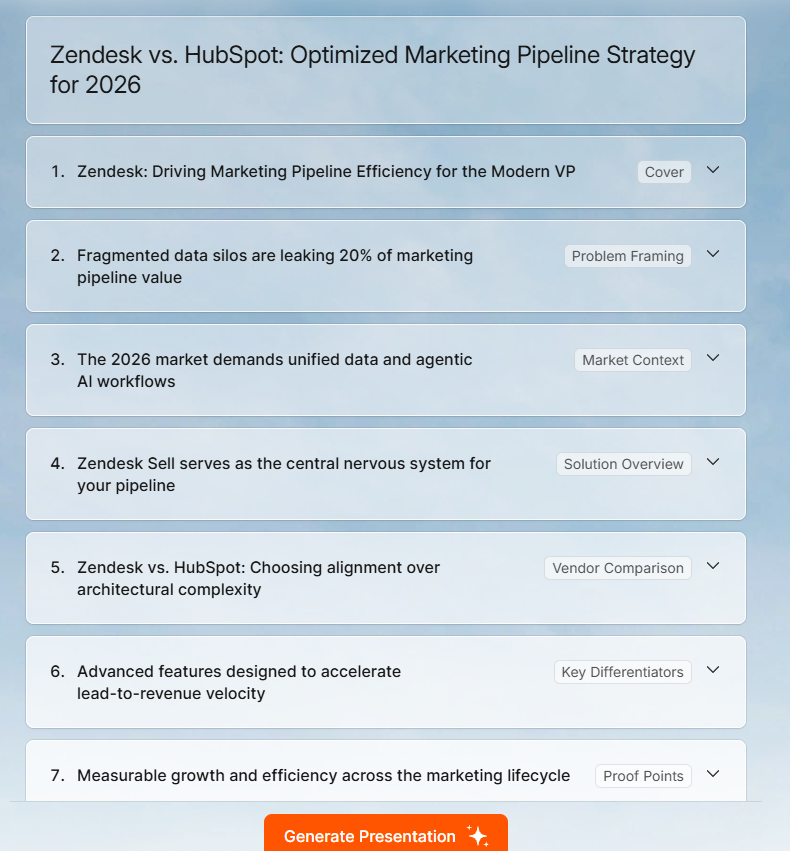
Estrutura de uma apresentação gerada pelo Presentations.ai
A maioria dos erros acima se resume a duas coisas: entradas pouco claras e edição negligenciada. Nossa IA de apresentação plataforma é construída para reduzir ambos. Você pode ler mais sobre o conjunto completo de recursos na página do criador de apresentações com IA do Presentations.ai, mas veja como ele aborda especificamente os problemas mais comuns.
Sincronização de Marca: Forneça o URL da sua empresa, e o Presentations.ai extrai automaticamente suas cores, fontes e logotipo. Cada slide na apresentação gerada reflete sua marca desde o início, sem qualquer configuração manual.
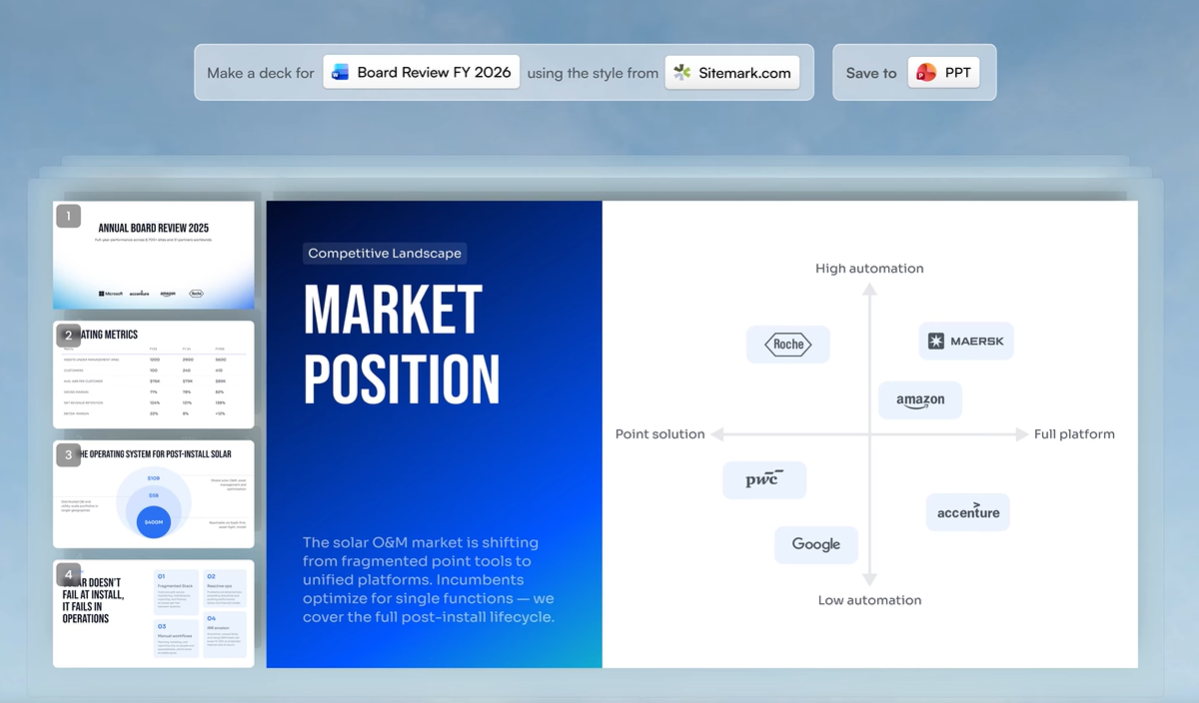
O Presentations.ai pode identificar as cores e fontes da sua marca diretamente do seu URL
Modelos flexíveis: Os layouts se adaptam à medida que você edita, em vez de quebrar quando você remove conteúdo. Isso facilita a simplificação de slides e o corte de texto sem reconstruir o layout do zero. Confira os modelos do Presentation.ai modelos aqui.
Múltiplos formatos de entrada: Além de um prompt de texto, você pode carregar PDFs, documentos Word ou colar um URL como seu ponto de partida. Isso baseia a IA no seu conteúdo real, em vez de informações genéricas sobre o seu tópico.
Edição conversacional Clip-E: Após a geração, você refina a apresentação através de uma interface de chat. Peça para um slide específico ser reescrito, encurtado ou reestruturado sem tocar nos outros slides. Isso torna a etapa de edição mais rápida e direcionada.
Exportação para PowerPoint: As apresentações são exportadas para .pptx com total fidelidade. Fontes, layouts e elementos de marca são transferidos intactos, então o que você vê no editor é o que seu público vê ao abrir a apresentação no PowerPoint.
Nada disso elimina a necessidade da sua revisão, principalmente da etapa de verificação de dados. Mas reduz o número de coisas que você precisa corrigir e torna as correções restantes mais rápidas de aplicar.
Conclusão
As ferramentas de apresentação com IA são realmente úteis. Elas não são úteis porque produzem apresentações finalizadas. Elas são úteis porque produzem rascunhos iniciais sólidos muito rapidamente, o que lhe dá algo concreto para trabalhar, em vez de um slide em branco e um prazo.
Os sete erros desta publicação decorrem do mesmo problema central: tratar a saída da IA como finalizada quando é apenas um ponto de partida. As correções não são complicadas. Melhores prompts, uma breve revisão, uma restrição de número de slides, uma verificação de estrutura e dados verificados transformarão a maioria das apresentações geradas por IA de algo que parece bom em algo que realmente funciona.
Se você quer começar com uma ferramenta que lida automaticamente com a consistência da marca e problemas de layout, para que sua revisão possa focar no conteúdo em vez da formatação, o Presentations.ai foi feito para isso. Experimente grátis em presentations.ai.
Crie Apresentações Melhores com Presentations.ai
Passe da ideia à apresentação finalizada em minutos.
Experimente o Presentations.ai Grátis
(Não é necessário cartão de crédito)